May 24, 2014

Best Earbuds Review - 3 Articles


Earbuds Review By Brian Lee at Top 10 Reviews:
Skullcandy INK'D rated tops

http://earbuds-review.toptenreviews.com/


---------------------------------
From Mashable:

1. Panasonic ErgoFit RP-HJE120-D

If you must go cheap, get the Panasonic ErgoFit RP-HJE120-D. For the bottom-of-the-barrel price you get decent sound and a comfortable fit.

I personally have several pair of these and they are a great all around performer. Highly recommended !
Cost: $9.99


2. MEEElectronics A151

While they don’t have extra features like an integrated microphone to wow you, the MEEElectronics A151 earphones offer detailed sound at a decent price.
Bonus: they come with a carrying case.

Cost: $39.99


3. Sennheiser CX 215

The Sennheiser CX 215 Earbud Headphones feature a noise isolating design that cancels out ambient sound, while 20Hz - 20kHz frequency response means the sounds you do hear are so faithfully reproduced, you’ll be shocked at the power. And with a rainbow array of colors to choose from, you’re sure to find a pair that matches your cell phone case.


Cost: $39.99


4. Jay A-Jays Four

Say bye-bye to tangled cords. The Jay A-Jays Four earphones have a beautiful, utilitarian design, a three button remote to control your iPhone and a flat cord. Do your worst, pockets.

Cost: $59.99


5. Klipsch Image S4i II

The Klipsch Image S4i II model adds some updates to the original design, like a flat cord that’s tangle resistant. But don’t worry, they still have the same impressive sound and comfortable fit. This model is most compatible with the iPhone, but Android users can try this option instead.

Cost: $69.99


6. Yamaha EPH-50BL

Yamaha’s EPH-50BL are comparable in quality to options in a far more expensive price range, and they’re so stylish, they’ll feel like part of your outfit.

Cost: $79.99


7. Sennheiser Mm70ip

For the heavy hitters, Sennheiser also has the Mm70ip model, which also features buttons to control the volume, play, skip, or pause tracks. Don’t feel like using your fingers? An integrated microphone allows you to activate Voice Control, or answer, end, or reject calls.

Cost: $99.99


Source: http://mashable.com/2013/08/27/best-earbuds/#_


Best earbuds (in-ear headphones)


Earbuds are commonly issued as freebie headphones with portable players, but higher-performance earbuds can offer sonic performance that rivals their full-size linemates. Their tiny earpieces rest on the outer ear or need to be inserted into the ear canal. Ultracompact and lightweight, earbuds are the most portable of all headphones, and they can provide excellent isolation from external noise when paired with a well-fitted tip.


Klipsch Image S4A for Android (Black)


Klipsch's ultracomfortable, noise-isolating ear tips are just one of the reasons I love and recommend the S4-series headphones. If you're an Android user shopping for a new pair of earbuds, the Image S4A headphones are definitely worth the $99.
4 stars Excellent


Klipsch Image S4i (II)


The Klipsch Image S4i II in-ear headphones add a new, more durable tangle-resistant flat cord while retaining the S4 model's very respectable sound quality and superior comfort.
4 stars Excellent


Shure SE425


The Shure SE425 sound-isolating earphones are an excellent choice for eclectic listeners who demand stellar audio and a high-quality design.
4 stars Excellent


Etymotic hf5


The Etymotic hf5 earphones are an excellent option for those who want the highest level of sound isolation without sacrificing sound quality, portability, or style.
4 stars Excellent


Bose SEI2 & SEI2i


While they're no bargain, the Bose SEI2 and SEI2i have an appealing, sweat-resistant design, are very comfortable to wear, and offer decent sound.
3.5 stars Very good


Bose QuietComfort 20


Despite some downsides, including a high price, the Bose QuietComfort 20 offers the best noise-canceling in an in-ear headphone and should tempt frequent travelers looking for a more compact alternative to a full-size NC headphone, such as the Bose QuietComfort 15.
4 stars Excellent


Westone 2 True-Fit


The Westone 2 True-Fit Earphones offer great sound and features for the money; those who find triple-driver earbuds too large for their ears should take heed.
4 stars Excellent


Etymotic ER-4PT MicroPro


While the Etymotic ER-4PTs have less low-end oomph than some competing earphones in this price class, they deliver excellent sound with very accurate tonal balance.
4 stars Excellent


Ultimate Ears 700 (Dark Silver)


With a sleek design, a range of ear tips, and supreme sound reproduction, the Ultimate Ears 700 headphones are worthy of an audiophile's ear and earn our recommendation.
4 stars Excellent


Velodyne vPulse


While some folks may encounter come comfort issues, the Velodyne vPulse in-ear headphones offer excellent sound for the money and will particularly appeal to bass lovers.
3.5 stars Very good


Phonak Audeo Perfect Bass 022 Earphones (with Microphone, Black)


The Audeo Perfect Fit Earphones PFE 022 + Mic are a solid choice for iPhone owners who desire balanced audio and a light, compact design.
3.5 stars Very good


Bowers & Wilkins C5


While the Secure Loop design may not be a perfect fit for every ear, the Bowers & Wilkins C5s are among the best-sounding earphones in their sub-$200 price class.
3.5 stars Very good

Source: http://www.cnet.com/topics/headphones/best-headphones/earbuds/

April 22, 2014

Re-purpose Your Old Laptop to Make Your Own ChromeBook

You’ve got an old laptop that doesn’t fly anymore on Windows but you still don’t feel like it’s the time to dump it. You’ve also looked at those ChromeBooks on the flyers and have been wondering what they are and what you can do with it. Hmm…what about putting the Chrome OS onto your old laptop and see how it works out?
I think it’s a great idea, especially if you are already using Google’s many services, such as search, email, or docs. And it’s very easy and straightforward.

Prerequisite

It’s very minimum. All it needs is one USB drive at minimum 4GB, and a laptop that has WiFi.

Chromium OS on USB

Now, let’s go to Built by Hexxeh to download the latest ChromiumOS Vanilla build. The download size is around 300MB, and it’s wrapped up in a ZIP format.
Once you have it downloaded, extract the IMG file from the zip file to a convenient location, i.e. your download folder.
To load it up to the USB drive, you will need a tool called Windows Image Writer, which is a free portable tool that writes IMG file directly to a USB drive and makes it bootable as well. Make sure back up your USB drive first, as it will be reformatted to a format Windows doesn’t recognize.


Windows Image Writer

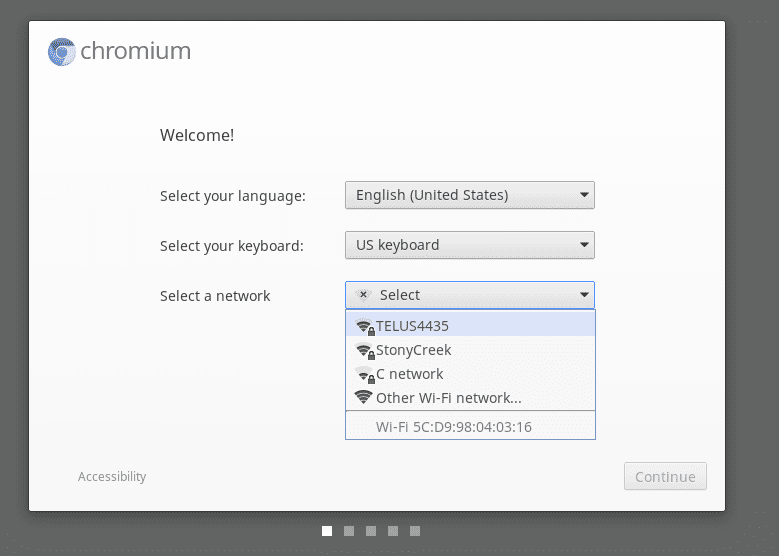
Now, plug your USB drive to the laptop and boot from it. If everything goes well, you will see a Welcome page within a minute.


Chromium OS Welcome

Chromium OS on internal HD

The Vanilla built of Chromium OS requires a USB drive. But with a bit of work, we can actually get around and make it on a hard drive, which is even better.
Basically, you can pull out the internal HD from your laptop and put it into a USB enclosure to make it as an external USB hard drive. Then use the same procedure explained above to load up the Chromium OS into that external HD. Once it’s done, put the HD back into the laptop. Hooray!!


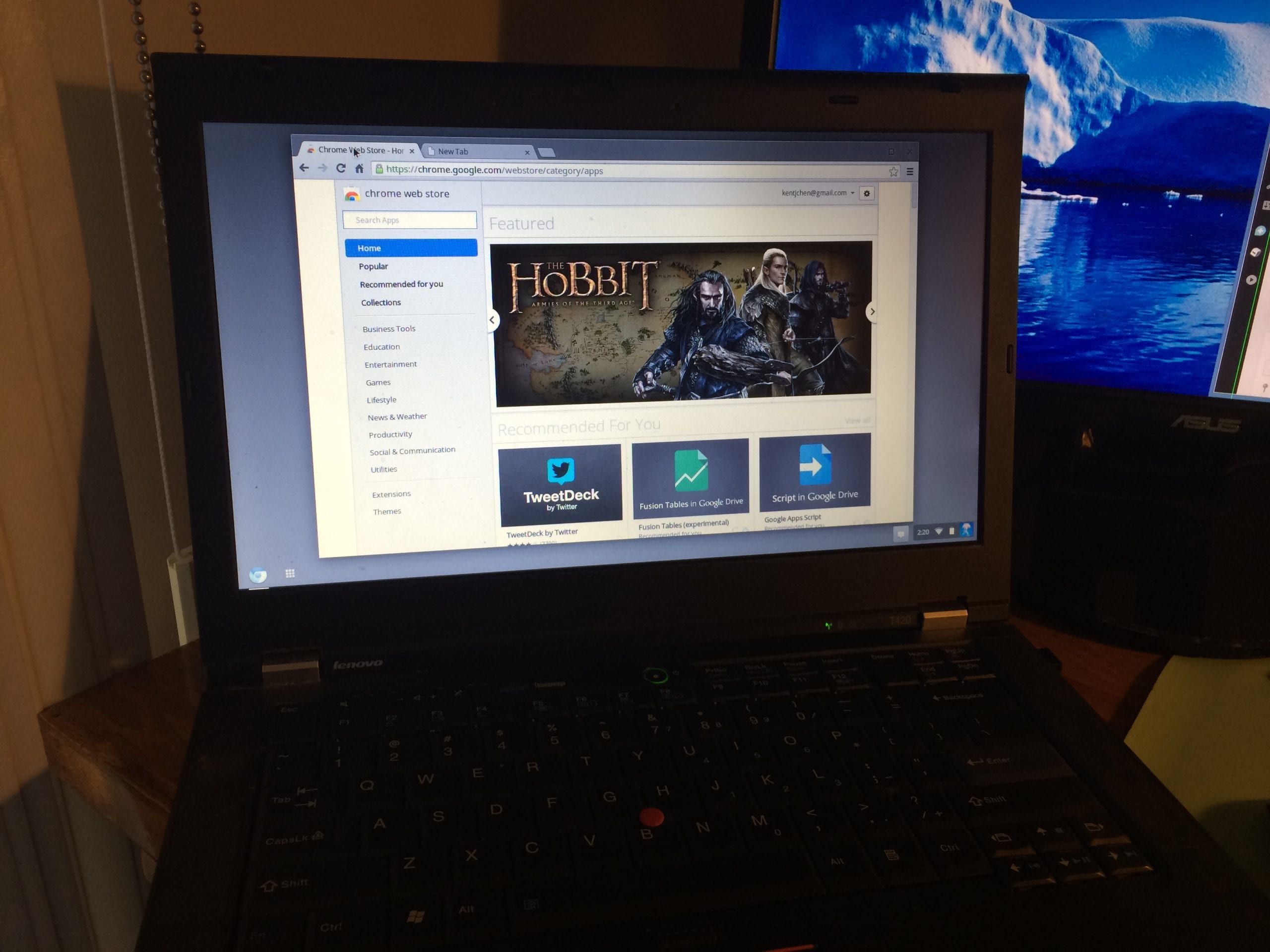
Now boot it up, and enjoy your very own home-made lightening fast ChromeBook. What’s even better is that if you have been using Chrome browser, all your apps, bookmarks, and even settings will be automatically synchronized over.


20131231_222007472_iOS

April 11, 2014

Foobar iTunes Skin

Foobar is an amazing music player for Windows. Below is an iTunes skin for it and the place you can find it. Enjoy.


You can download the theme here:

http://nrossow.deviantart.com/art/iTunes-for-foobar2000-114611164


Foobar Main features


January 26, 2014

Zero Dollar Movies Finds Free Films on YouTube

Zero Dollar Movies Finds Free Films on YouTube
With the internet, there's no shortage of free media out there if you can find it. So much, in fact, that if you're ever looking for inspiration, you should be able to find it. Zero Dollar Movies is just another source of free entertainment.
The site aggregates feature-length movies on YouTube. Of course, since the site searches what's available on YouTube and less-than-official versions of movies sometimes end up on there for a while before they get taken down, big name movies occasionally slip through the cracks. However, largely the site's library is legitimate and impressive for not spending a dollar.

Crackle: Watch Free Full Length Movies & TV shows

Crackle is a video entertainment website from Sony Pictures Entertainment Company. It works like the Sony’s version of Hulu where you can watch free full length movies, TV shows and original web series straight from your browser. The large library of videos also includes popular films, “minisodes”, and many cartoons.


image thumb12   Crackle: Watch Free Full Length Movies & TV shows


Crackles offers content in variety of genres like comedy, action, music, sci-fi, and reality. You won’t get much of the latest movie releases from Sony, but you can easily watch older films such as Godzilla, Ghostbusters, and the Next Karate Kid. If you are a fan of classic TV, you can watch decades’ worth of shows such as I Dream of Jeannie, Party of Five, and Astroboy.
Crackle content can be watched across multi-platform media destinations like Sling Media Player, Boxxee, Veoh, Youtube, Hulu, Metacafe, and many more. Unfortunately Crackle videos are limited to U.S. audience only.


image thumb14   Crackle: Watch Free Full Length Movies & TV shows


Features:
  • Free full length movies to watch online.
  • Watch high quality original web series.
  • Get Crackle videos from your favorite website or media software.
  • Can be configured to work with Boxxee, Sling Player.
  • Upload, share, rate, and comment personal videos.
  • Play Cinemactive and test your pop-culture knowledge.
  • Also see “Ditch Your Cable Company With Free, Legal Alternatives“.
Check out Crackle @ www.crackle.com

Source: http://www.makeuseof.com/tag/crackle-free-full-length-movies-tv-shows-from-sony-pictures/

January 7, 2014

30 Best Audio software for Windows PC in 2014

In previous articles you read about some of the best video software and in this article you’re going to read about some of the best audio software for your Windows OS which we manages to get under the same hood.

Best Audio Software for Windows

In this article of audio software you’re going to read about audio tools like Audio convertors, mixers and codec. Also you’re going to read about some cool software using which you can make your own music. And the bonus is that we also covered some softwares using which you can listen to your music collection.
So without wasting single second, let us have look at first audio software i.e.

Virtual DJ is one of the most popular Deejaying software which is used for mixing and playing digital audio and video tracks.
FL Studio is one of the common Audio players being used by us for audio recording, composing, mixing, sequencing and for the creation of professional quality music.
3. iTunes
It is the famous Audio player developed by Apple and used to Play, Download, mix, compose  and organize digital music on your personal computer. It works with Windows OS and iOS.
Zune is well featured Media player developed by  Microsoft, it organizes the media into its library and allow users to add music from CDs and downloading from the Zune market.
It is the Audio mixing console that is designed for disco jockeys. Any DJ can be used as a mixer but it has some special features that make it useful only for DJ’s. It has special knops and sliders which you will not find in any other mixer.
6. Winamp
Winamp is the Best and the most common Audio player which is highly featured, it has some awesome features like playback format, podcatcher, Media monitor, Winamp remote, Plug-ins.
It is a tool through which you can cut or remove some portion of music and also edit mp3 and WAV file, it provides features like cut, copy, paste, volume change operations, audio normalization and pause detection.
 Using this software you can download and save videos directly from YouTube, Google, Metacafe, Putfile and more. Simply copy and paste.
AC97 is the famous audio codec developed by intel.  All audio components are installed on chipset, it enables plug and play audio for users.
It is a tool through which you can split audio files into different ones and with a feature of joining you can re-join such small audio files.
It is a software developed to audio and video files conversion. It supports conversion of MP3, MP4, AAC, WAV, WMA audio file format and MP4, WMV, AVI video formats, also converts MP4 files to MP3.
12. WavePad
Wavepad sound editor is designed  for audio editing, it provides special features like fade in or fade out of a clip, mix multiple sound tracks and conversion between different file formats.
 Its one of the world’s best digital music jukebox. Download music, TV shows, movies, and more.
14. AIMP
AIMP is the popular and a superb audio player designed for windows. AIMP can play many file types like MP3, AAC, Dolby AC3, APE. It has some more features  as a Last FM scrollbar, bookmark and playback queue creation.
Jet is the most common and widely used audio players known for its awesome features, it offers metadata editing, CD ripping and burning, data conversion, sound recording, internet radio broadcasting.
 Its one of the best mixing software for personal DJs with wide variety of features and tools.
It’s a free media studio using which you can search, play music online and download music on your Windows PC
Nokia Ovi Player is free software for your Windows PC using which you can download and play music on your PC and transfer it to your mobile. You can also explore music on OVi which is already installed in this software.
It’s an easy to use software by Sony which is used for managing portable devices when they are plugged in the device in which Windows is installed.
It’s a perfect DVD and Blue Ray burning suite using which you can create data and music discs. You can also quick backup copies  and virtual disc images.
21. ALLPlayer
It is well designed media player which allow to play music with subtitles in a variety of formats, it has special features like Life Update, Integration with a reader for subtitles reading, password protection of media and it automatically  download subtitles from the internet.
22. Audacity
Audacity is one of the best available digital audio editor available for Windows, MAC, iOS. It allows recording and playing back sounds and multitrack mixing.
It is one of the first program to become popular as an audio convertor for Microsoft Windows. It is able to rip CDs, record audio coming in via mic jack, capture audio playing on the computer into different formats.
It is the well featured program which works as music converter and CD rip, it converts several audio formats mp3, mp4, m4a, WMA , AAC , monkey audio and rip CD fast, bit-perfect and secure.
It is a highly featured audio player with several special features such as it supports different type of  file formats like mp1, mp2, mp3, AAC, WMA, it provides customizable user interface layout, Gapless playback support.
It is one of the best audio players and fully featured as an advanced interface with large music collections, it provides features like ambience management, advanced rating system, file management and prepare the party.
27. Spotify
Its a digital music service using which you can stream millions of songs in different categories. This service has music for every environment all you need to do is play, discover and if you like the music, share it with your friends.
28. Mp3 tag editor Tag&Rename
It is an ultimate software for music file management that easily handles all popular digital audio formats, it has a  feature to organize your media collection quickly and easily.
29. Winamp Media Player
Winamp is the Cool and the most common Audio player which is fully featured for the advanced user, it has some awesome and outstanding features like playback format, podcatcher, Media monitor, Winamp remote, Plug-ins.
30.Songbird
It is an audio player which is the first Web Player available for Windows and MAC OS. It supports multi audio  file formats, it provides multi-platform compatibility, a skinnable interface called “feathers”.
So these are some of the best audio software worth download for Windows OS. So give a try to these and don’t forget to share your opinion about these software’s with us. You can also share the name of audio software which you found missing in the above list.

Source:  http://nerdsmagazine.com/best-audio-software-for-windows/

December 12, 2013

40 Best Music Streaming Websites [Free and Legally]

In today’s article we are going to answer the question, i.e.  What are some best music streaming websites? And if you’re the one looking for answers to the same question, then we recommend you must check this article.


Best Music Streaming Websites


Recently we added lots of articles related to music download, but every is not fan of fill up space on their hard disk and choose to stream music online. The internet is one of the best inventions created ever and where you can find anything. Whether you love greater interest in streaming general music, music discovery, Mixtapes or anything related, you can find all just by making some clicks. You might also love to read about:
We all know that there are lots of music streaming sites over the web but due to following restriction
  • Service at some sort of price
  • Restriction in loading the page due to copyright
And due to this you might hate music streaming online, but don’t worry anymore. And to give solution to this problem we’ve scraped through the lots of web services which provide music-streaming and gather some of the best, so that you’ll find out which service made the top spot. Also don’t forget to share any good web service if I missed any.

1. Grooveshark

Grooveshark is one of the best web services using which provides free music streaming, online radio stations, and lets you connect with artists and friends.

2. Last.fm

Another cool website is Last.fm, which is named as the world’s largest online music hub, powered by your scrobbles. Here you can listen to free personal music online, also find free internet radio, videos, photos, stats, charts, biographies and concerts.

3. MySpace Music

MySpace music is another best and legit site to listen to music online for free. Here you can also discover new bands and artists, watch music videos, get tour dates, music, news, other fans, and more.

4. Pandora

Pandora is counted as one of the music services available on the web, popular for its huge  library of songs. If you love to listen music then you will defiantly play those here, at Pandora. So Indian this is not available for your country.

5. Rhapsody

Rhapsody is one of the oldest digital music streaming service allows you to listen all you want from wherever you are. It’s the ultimate music cloud experience, over 16 million tracks.

6. AH.fm

Ah.fm is amazingly simple website plus forum where you can listen to Streaming techno and dance music. You can also discuss music in a forum.

7. AmazingTunes

Another cool website where you can listen music for free. Not only this you can also download music and 100% of profits go to the artists. All you have to do is search for artists you want to hear or choose from a list of stations.

8. Aol- Free Radio Station

Here you can free music streaming from actual radio stations powered by CBS Radio.

9. Deezer

Deezer is French web-based music streaming service which allows users to listen to music on various devices online or offline. You can also share music with your friends and embed music on websites

10. DI.fm

Digitally Imported is another cool website to stream music, the website is specialized in streaming dance and electronic music from all over the world.

11. live365

This is another cool website with a mixture of free stations and if you want to listen music without commercial interruptions become VIP of this website.

12.  Magnatune

Here you can listen or stream music of independent artist and guess what you can also buy them by naming your price, starting at $5.00.

13. MikesRadioWorld

MikesRadioWorld is another cool hub of over 5,000 streaming radio stations from the USA, Canada, New Zealand, Australia and Europe.

14. MP3.com

Like other website this is another good website to listen and download music for free. Also in spotlight section of this website you will get a review of the music and artist.

15. TuneIn

Here at this website you can collect streams from radio stations from all over, You can browse by Music Genre and top live radio right now.

16. SHOUTcast

At shoutcast you can join people streaming radio right now. Here you can listen to your favorite Internet radio stations including Christmas, pop, R&B, dance and much more.

17. Slacker

Slacker is a cool website where you can  listen to their pre-built stations, One thing which I really like about this website is that you can create your station own.

18. Streampad

Streampad is another good website where you can search for music you want to listen. Music Player also creates a playlist the songs which you want to listen.

19. TheSixtyOne

Good website to stream music for free, I really like the stylish theme of this website. This website also allows you to purchase music via amazon.com mp3 store.

20. Yahoo Music

Yahoo Music, owned by Yahoo, which provides variety of music services, including Internet radio, music videos, news, artist information, and original.

21. RadioTuna

Another cool website for streaming music and simple search by putting your artist name and song, it will show all online radio stations that play.

22. Skreemr

Cool website where you can find, Play and download free MP3s.

23. Audiolizer

At Audiolizer you can listen to music, create playlists and upload your library to listen on the go for free.

24. Jelli

Is amazing crowdsourced radio – everyone gets a say, but no-one’s entirely in charge. This can make for some pretty interesting listening.

25. Dilandau

In dilandau you can share, listen and download all your favorite music in MP3 format.

26. MOG


Another cool website for streaming music and one thing I really like about this website is the sound quality of its music selection. MOG’s entire music selection streams at 320kbps.

27. SoundCloud

Create, record and share the sounds you create anywhere to friends, family and the world with SoundCloud, the world’s largest community of sound creators.

28. Google Music

Google rolled out a personal streaming music option called Google Music Beta. Only for US citizens.

29. 8tracks

Listen to the best internet radio, crafted by people who know and love music. Or you can also legally share your own online mix, a streaming playlist with 8 or more tracks.

30. PureVolume

PureVolume is another cool website specially for rising artists to hot their mp3 music and get exposure. You can stream music here for free, this website also showcases unsigned artist, independent labels, and major label artists.

31. Pump You Up

This is another cool website which promoting Indie, Small Label free dubstep, free techno, free house music, free trance and best electronic music downloads. You can also stream those for free.

32. 22tracks

22tracks is the perfect guide in a crowded musical landscape.

33. Hype Machine

This website is another cool place to find new music on the web. Hype Machine also featuring different categories like tracks, artist, twitter, remix and no remix. Now it’s up to you from which category you want to hear music.

34. Jango

Free internet radio, just like Pandora only fewer ads and more variety. Listen to hundreds of genre stations or create your own with your favorite music.

35. Musicovery

The easiest way to listen to your own music library and discover new songs, wherever you are

36. Tweewoo

Tweewoo is the best place online to listen to all the best new music and songs on our hundreds of free internet radio stations.

37. Accuradio

AccuRadio is a customizable online radio. Over 500 free Internet radio stations: Rock, Pop, Classical, Country, Jazz, Oldies, Broadway and more!

38. Just Hear It

Search and listen for any song in the world for free. You can also buy music if you need.

39. DeskAmp

Another cool website to stream mp3 music for free, also you can watch video of the song you listening.

40. FratMusic

Fratmusic is another good and last website of this article. You can search and stream music here in the different featured category. Also you can submit your playlist, they’ll email you if we choose it.
So finally we are done, these are some of the best music streaming website which I found are better according to our niche. If you feel that I forget to miss some good name, also if you have any suggestion don’t forget to leave comments.

November 26, 2013

How to Turn Your Old Gadgets into Cash (So You Can Buy New Gadgets)


Whether you want to sell off your old smartphone to pay for the new one, add a little cash to your fun money pile, or to put the proceeds towards Christmas, we’re here to help. Read on as we outline the best ways to turn your old gear into money.
When it comes to turning your older gadgets into cash, there are three main venues to explore: trade-in programs, auction sites, and local sale. Each of these venues has distinct advantages and disadvantages which, after reviewing our breakdown of the venues below, you’ll need to balance against your own desire for speedy resolution, amount of cash, and degree of risk you’re willing to take.

Converting Gadgets Through Trade-Ins

When you want the money right now and you don’t want to have to wait for someone to actually purchase your device, trade-ins are the best option. Instead of listing your device on an auction site or haggling back and forth with a buyer on Craiglist, trade-in services allow you to simply say “You’ll give me X amount of money for my old iPod? Great. I’ll mail it in right now.”
That’s the huge upside to the trade-in system, assuming you describe the condition of your device accurately when submitting it for a trade-in (e.g. you don’t claim your cracked screen iPad is mint condition) it’s a frictionless process. They offer you the money for the gadget, you accept, you mail it to them, and you receive your payment for the gadget.
The downside to the trade-in system is pretty straight forward: the resellers you’re trading the gear into want to profit from the exchange so of course they’ll offer you less than the open market (eBay or Craiglist, for example) would bear. What could sell for $300 on eBay might only fetch $200-250 on the trade-in sites.
So what do the sites look like and what can you expect when you use them? We put the five biggest trade-in sites through the paces using four common last-generation gadgets many of our readers would potentially sell: an iPhone 4S (16GB/ATT), an iPad 3 (32GB/Wi-Fi only), a Samsung Galaxy SIII (16GB/ATT), and a Kindle Fire HD (7″/32GB/Wi-Fi only).
Here’s how we fared checking the trade-in values at the sites. Listed prices are for the previously mentioned items in like-new condition:

Gazelle
Gazelle specializes in Apple products (iPhones, iPads, iPods, as well as Apple computers) as well as smartphones and tablets from other major companies.
Trade-In  Breakdown:
iPhone 4S – $170
iPad 3 – $230
Galaxy SIII – $126
Fire HD – $49
Total Trade-in Value – $575
Shipping: Gazelle foots the bill for shipping on any item worth more than $1 (why you would pay to ship them an item worth less than a dollar is a mystery).
Local Trade-In: No.
How You Get Paid: Gazella will cut you a check (you’ll be waiting on the mail for this option), PayPal you the money (instant), or convert it into an Amazon Gift Card (also instant). It’s nice to have options; we definitely appreciate organizations using PayPal.


Amazon Trade-In
Amazon Trade-In is as diverse as you’d expect any Amazon offering to be. Although we only tried it out with the electronics we’re using for this roundup, you can trade in just about anything: books, DVDs, routers, video games–you name it.
Trade-In  Breakdown:
iPhone 4S – $200
iPad 3 – $241
Galaxy SIII – $140
Fire HD – $116
Total Trade-in Value – $697
Shipping: Free. If there’s anything Amazon has on lock down, it’s the shipping industry. You trade it in, they pay the shipping bill for you.
Local Trade-In: No.
How You Get Paid: If you expected anything buy Amazon gift cards at your payment, well, we don’t know what to tell you. You trade it to Amazon and, whether Amazon pays $10 or $1000 for your loot, you get it all back in the form of an Amazon gift card. In light of how many things you can by on Amazon and through the Amazon checkout system on participating web sites, it’s about as close as a gift card can get to cold hard cash.


Nextworth
NextWorth offers a more diverse spread of categories than Gazelle and includes not only smartphones, tablets, and laptops but also digital cameras (including DSLRs), video games, and game consoles.
Trade-In  Breakdown:
iPhone 4S – $135
iPad 3 – $217
Galaxy SIII – $140
Fire HD – $65
Total Trade-in Value – $557
Shipping: Free. There’s a pattern developing here. Clearly the trade-in shops know that most people will balk at spending $20 on shipping for their old gadgets.
Local Trade-In: Yes; NextWorth has partnered with over 1500 retail locations (most notably Target) so you can trade your gear in without the hassle of packing and shipping it.
How You Get Paid: You can collect your payment via PayPal, Target gift card, check, or with a NextWorth branded prepaid Discover card.


Best Buy Trade-In
Best Buy
Trade-In  Breakdown:
iPhone 4S – $99
iPad 3 – $220
Galaxy SIII – $126
Fire HD – $50
Total Trade-in Value – $557
Shipping: Free.
Local Trade-In: Yes; you can walk in to any participating Best Buy location (pretty much any major location, barring small holiday satellite stores) and they’ll assess your gear and either accept it or offer to recycle it.
How You Get Paid: You guessed Best Buy Gift Cards? You guessed right. Great for buying yourself or your loved ones more gadgets, not so great for paying the electric bill.

BuyMyTronics
BuyMyTronics, a subsidiary of GameStop, offers something that none of the other major trade-in shops offers: they’ll buy broken electronics. For example, you won’t get the like-new price of $191 for selling them an iPad 3 with a broken screen but they will offer you up to $60 for it. If you don’t want to deal with repair costs on older gear, it’s worth seeing if they’ll offer you anything at all for it.
They buy ebook readers, camcorders, GPS units, and a wide variety of electronics in addition to the typical smartphones and tablets. What’s strange about their offerings beyond the typical smartphone/tablet listing is that 90% of them are “recycle only”. Why they felt the need to make two dozen listings for different BlackBerry models just to tell us that it was old and they didn’t want to do anything but recycle it is rather puzzling.
Trade-In  Breakdown:
iPhone 4S – $149
iPad 3 – $191
Galaxy SIII – $138
Fire HD – $55
Total Trade-in Value – $533
Shipping: Free.
Local Trade-In: Yes; but the system is only partially deployed. All GameStop locations accept trade-ins for store credit when dealing with game consoles and video games (as they always have) but very few GameStop locations are fully equipped to accept the wide range of electronics you can trade in through the BuyMyTronics web site. Call ahead to see if your local GameSpot is participating.
How You Get Paid: Check (3-5 mailing time) or PayPal (instant).
With all these variables at play, you really have to weigh what is most important to you. If you want money to spend on Christmas gifts right now, taking advantage of the in-store systems offered by Best Buy and NextWorth make it worth losing a few bucks over a better offer from Amazon, for example. Regardless of the system you use, however, the real benefit of the trade-in system is that (whether you get a lot or a little) you’re going to get cash for your gear.

Auctioning and Listing Your Gadgets


If the upside of the trade-in sites is that you get your money quickly, the downside is that you definitely don’t get the market value for your gadgets. If you want to get top dollar for your gear, you’re going to have to take the harder route and sell it on an auction site (like eBay) or list it on moderated listing sites (like Swappa) or local listing sites (like Craigslist).
The upside of taking such an approach is that you can get top dollar. The downside is that getting top dollar is completely dependent on someone purchasing the product you’re trying to sell and, in the case of site like eBay, you lose some of the money to fees.
So how do auction sites and listings stack up? We compared the biggest auction site, eBay, against the biggest cellphone and gadget listing site Swappa. Because Craigslist doesn’t have any sort of historical price tracking feature and has more volatile prices, we can’t offer concrete numbers on how much or little money you’d make.

eBay Instant


eBay used to have a legitimate trade-in program like the ones we were just discussing, known as eBay Instant. They stopped the trade-ins in March of 2013, but they kept the Instant portal. Now, instead of allowing you to send your loot to eBay for sorting and a pay out, the Instant portal serves as a ridiculously fast way to list gadgets you want to sell as quickly as possible. If you’ve skipped using eBay in the past because you didn’t want to deal with the hassle of making a listing, you should really trying eBay Instant out. You search for your item, eBay tells you what the current average sale price for the item you’re trying to offload is, and you can click a single button to preview the listing (and another to immediately list it). We went from looking at iPhone 4S prices to creating an iPhone 4S listing in under 30 seconds.
You can always use the regular eBay interface, of course, but the eBay Instant interface was most like the trade in sites and offered similar convenience. Here’s what eBay suggested we’d likely get for our various listings:
Average Sale Prices: 
iPhone 4S – $260
iPad 3 – $362
Galaxy SIII – $280
Fire HD – $172
Total Sale Value – $1074
Now, those of you that have been keeping a running ledger as you’ve read along are likely saying “Over a thousand dollars! eBay is for me!’ You will definitely make more money on eBay, no doubt, but there are some additional expenses to consider. eBay takes 10% as a fee for most electronics sold (for both auction and buy-it-now format). That’s $107 right there. Let’s also assume we’re going to spend $5-10 packing and shipping each item. That’s $20-40 making sure that iPad and friends is securely packaged. So by conservative estimate we’ve burned up $127 worth of our profit right there and brought the average price down to $947. Never the less, assuming we can move all the product we’ve listed on eBay, we’ve still made around $250 more than our best trade-in option for the total sale.

Swappa
Swappa is site dedicated to buying and selling smartphones and tablets. You can’t sell your old Xbox 360 or Macbook Air here, but you can get eBay style efficiency without eBay’s listing fees. You are, however, still at the mercy of the market and if nobody is looking for what you’re selling you may not even make the $50 Amazon and the like was offering you. Swappa does do a nice job giving you the average sale price of the item you’re listing over the last few months. Here’s what we could expect to make off our loot:
Average Sale Prices: 
iPhone 4S – $240
iPad 3 – $283
Galaxy SIII – $231
Fire HD – $155
Total Sale Value – $909
You’ll still need to fork out for shipping the items you sell, but you won’t lose any money on listing/auction fees. Assuming you spent $20 shipping the gadgets we listed above, you’d walk away with around $890.

As we mentioned early on the in guide, you have to find the venue that provides the right balance of return for your effort and convenience. If you want the money right then to spent on a new iPad, driving to a nearby store for an in-store trade is as fast as it’s going to get. If you want maximum return for your money you can try your luck with a buy-it-now eBay auction and eat the auction fees in order to get potentially 50-100% more than the trade-in venues would offer. Regardless of how you move your old electronics, though, it’s still better to find yourself with cash in your pocket than a drawer full of rapidly depreciating last-gen gear.

Source: http://www.howtogeek.com/176204/how-to-turn-your-old-gadgets-into-cash-so-you-can-buy-new-gadgets/

November 21, 2013

How to save Internet Radio Stations in WMP

I've been comparing the various media players and still enjoy Windows Media Player. iTunes is a memory hog. Foobar is lightweight and does not play video. WMP does not take up much memory and has a lot of features. I listen to a lot of free Internet Radio and like to save my favorite stations in the playlists. Below is info on how to do this.


You can search for Radio Stations from the Seach Bar.


How to Add a Radio Station to Windows Media Player:

a. Click the Windows "Start" menu and click "Windows Media Player" to launch your media player.

b. Click the "Guide" tab located on the top to access the Windowsmedia.com Media Guide. Click the "Radio Tuner" link to launch the Radio Tuner.

c. Click the radio station name you want to add to Windows Media Player and click "Add to My Stations." Click the "Guide" button to return to the radio stations list.

d. Click the "Library" button as your radio station is playing if you want to add your radio station to a playlist. Click the "Now Playing List" and click "Save Playlist as." This launches the "Save as" dialog box.

e. Type a name for the radio station in the "File name" dialog box and click "Save." The playlist for your radio station is saved in the "My Playlists" folder.


You can also refer the following links for additional information:

Step 1:

Listen to radio in Windows Media Player:


Here is a YouTube video how to it:


November 3, 2013

14 Websites To Find Free Creative Commons Music

We’ve at MakeUseOf.com have introduced you to a variety of quality image sites where you can find Creative Commons images, but the Creative Commons license goes far beyond just images. Different types of content are licensed online using Creative Commons — videos, music, and even blog content. You’ll find plenty of it online to share, remix and use commercially. When it comes to Creative Commons music — there are certainly no shortage of websites with audio you can use for any occasion.

With Creative Commons licenses, you do have to be sure to take a careful look at the specific license which will show you exactly how you can use the content that has been provided for free. There’s no better place to learn about the various CC licenses than the official Creative Commons website.  


SoundCloud

SoundCloud


SoundCloud is a great resource for people looking to share their music, podcasts, and more, so it’s no surprise that you can find a lot of decent Creative Commons recorded sounds as well. There are a few ways you can find CC tracks on SoundCloud. The easiest way to find quality sounds is by going to the moderated Creative Commons group, which currently has over 3,000 clips. There are also some accounts that share tracks including we are cc and Crazy Language. To find out more about the service, check out our in-depth review of SoundCloud.  


JewelBeat

JewelBeat provides its users free-to-use music, which you can use in your online videos, ads, and more — the only requirement is crediting the site by adding a credit link to the website. You can also let them know, via Twitter or Facebook, where you used the music. There isn’t too much to choose from, and no way to search the site, but the complete lack of restrictions make it a good place to start if you’re looking for totally free music.


Jamendo

Jamendo


Jamendo boasts a library of over 400,000 tracks, but not all of them are licensed under Creative Commons, so when selecting music from this site, be sure to choose only the tracks that are available to use for free. While you can’t filter your search results to show only CC-licensed results, any tracks that aren’t free to use will have a ‘pro’ button next to them so they’re easy to spot. The license for the tracks are listed at the bottom of the page, so be sure to scroll down to the very bottom to check exactly how you can use the audio.


Audionautix

Audionautix


Audionautix features only music licensed under the Creative Commons 3.0 unported license. That means you are free to share and remix the audio, and use it commercially. A nice feature that Audionautix brings to the table is allowing you to search for tracks not only by genre, but also by mood and tempo. This could make it much easier to stumble upon the perfect track for your work.


Free Music Archive

FMA


The Free Music Archive’s tagline is one that will appeal to anyone who’s been on the hunt for decent Creative Commons music — “It’s not just free music; it’s good music.” As you search for music, by genre or curator, you can open up each track or album to see what kind of license its creator has shared it under. Genres include spoken, international, rock, hip-hop, electronic, and more.


FreeSound

FreeSound


FreeSound allows its visitors to search music by tags. A huge tag cloud will give you a place to start if you’re not entirely sure what type of song you want to use. You’ll need to sign up for a free account to download audio files, and as always, be sure to take a look at the exact license listed on the track’s page so you know how you can use the audio.


Incompetech

Incompetech is a good place to find full-length Creative Commons tracks, and like Audionautix, you can search the library by genre or by mood (or feel as they call it). Music on this site is licensed under the Attribution 3.0 Unported license, meaning you are free to share, remix and use commercially, as long as you credit the site. If you’d rather not credit the site, Incompetech allows you to pay a nominal fee to do so.


CCMixter

CCmixter


Another major Creative Commons library that is not to be missed is CCMixter. The site is packed with music that is free to download, sample and share. As is the case with all sites, you should take a close look at the license on each clip so that you adhere to the license restrictions — particularly as far as using the music in any sort of commercial way. To find out more, check out our in-depth review of CCMixter.


Bumpfoot

Bumpfoot describes itself as ”a non-profit netlabel in Japan,” which releases full albums under the Attribution-Noncommercial-Share Alike license — meaning you can share and remix their tracks, as long as you credit Bumpfoot and this is one site which explicitly states that you cannot use their tracks for commercial purposes. The tracks are mainly techno, house, ambient, and IDM. (A netlabel, for those of you who were wondering, is an online label).


Musopen

Musopen


In its own words, Musopen is a “non-profit focused on improving access and exposure to music by creating free resources and educational materials. We provide recordings, sheet music, and textbooks to the public for free, without copyright restrictions. Put simply, our mission is to set music free.” If you’re looking for a piece of classical music for your project or video, they provide recordings, as well as the sheet music. You can browse by composer, performer, instrument, period, or form.


CCTrax

CCTrax


CCTrax allows you to search an entire Creative Commons library of music by genre. Genres listed on the site include electronica, dub, hip hop, house, jazz, piano, and modern classical. They also have a handy flowchart that breaks down the Creative Commons licenses so you can better understand what each individual license means and, if you want to share your music, which one is right for you. 


Internet Archive

The Internet Archive is a place you can go to find a lot more than just free music, but one section of the site links to a bunch of netlabels, including Bumpfoot among many others.


iBeat

ibeat


iBeat offers free tracks which you can browse by genre — alternative,  urban, pop and more. In addition to browsing tracks by genre, you can also browse by instrument.


Audiofarm

AudioFarm


Finally, Audiofarm provides its visitors with Creative Commons tracks, and in addition to finding music of various genres, you can also download voice recordings, if that happens to be what you’re looking for. Voice recordings included on Audiofarm are voice acting, comedy, and news. This is another site where you need to check the license as not all content shared on Audiofarm is licensed under Creative Commons.

You can be sure that there are more music libraries out there. Can you think of any other sites to add to the list? Do you use Creative Commons in any creative way? Let us know in the comments.

Source: http://www.makeuseof.com/tag/14-websites-to-find-free-creative-commons-music/


Honorable Mentions:


Noisetrade.com


Bandcamp.com