Windows Vista RC 2 Software Compatibility List
From IeXwiki
(Redirected from
Windows Vista Software Compatibility List)
NOTICE: This time around we've started fresh and reset the page content due to Vista having reached a new level of maturity with its Release Candidate 2 status.
This entry shall enable all ieXwiki members to create a list of software, that will work with Vista RC2 (Build 5744), or won't work, so that it's possible to check that even before installation. Feel free to contribute.
For our previous results, check out
the Beta 1 listing or
the Build 5219 listing or
the Build 5270 listing or
the Build 5308 listing or
the Build 5342 listing or
the Build 5365 listing or
the Build 5381 listing or
the Beta 2 (Build 5384) listing or
the Build 5456 listing or
the Build 5472 listing or
the Build 5536 listing or
the RC1 (Build 5600) listing or
the Build 5728 listing.
However, for our hardware compatibility results, please see
this alternative listing.
NOTES:
Entries are in alphabetical order.
Please mention the version/build number of the software and if it applies to the 32-bit and/or the 64-bit beta OS (e.g. "Software vX.XX.XXXX (32- and 64-bit)")!
All 16-bit software will fail to run on Vista as such legacy support has been removed from the OS!
Contents
[
“ “]
1 Works1.1 Academic1.2 Anti-Spyware1.3 Antivirus1.4 Audio1.5 Backup1.6 CD/DVD Authoring1.7 Compression1.8 Defragmenting1.9 Developer Tools1.10 Emulators1.11 File Sharing1.12 Download Managers1.13 Firewalls/IDS's1.14 FTP1.15 Games1.16 Graphics1.17 Media1.18 Messaging1.19 Office Tools1.20 VPN Clients1.21 Network1.22 Web Browsers and Plugins1.23 Miscellaneous2 Has problems, but they can be solved2.1 Academic2.2 Anti-Spyware2.3 Antivirus2.4 Backup2.5 CD/DVD Authoring2.6 Compression2.7 Defragmenting2.8 Developer Tools2.9 Emulators2.10 File Sharing2.11 Firewalls/IDS's2.12 FTP2.13 Games2.14 Graphics2.15 Media2.16 Messaging2.17 Office Tools2.18 VPN Clients2.19 Network, web servers, etc2.20 Web Browsers and Plugins2.21 Miscellaneous3 Heavy problems, currently incompatible3.1 Academic3.2 Anti-Spyware3.3 Antivirus3.4 Backup3.5 CD/DVD Authoring3.6 Compression3.7 Defragmenting3.8 Developer Tools3.9 Emulators3.10 File Sharing3.11 Firewalls/IDS's3.12 FTP3.13 Games3.14 Graphics3.15 Media3.16 Messaging3.17 Office Tools3.18 VPN Clients3.19 Web Browsers and Plugins3.20 MiscellaneousNOTICE: It seems that most, if not all, Java-based Windows applications disable Aero Glass. This is only temporary and the effects are restored when the program is closed. This issue has been fixed in the latest builds of Java 6 which can be obtained
here. Please denote any applications that are Java based with a "{Java}".
[
“ “]
Academic
ACD/ChemSketch v8.17 (32 Bit)
Fluent v6.2.16 (32 Bit) [NOTE: Installation directory copied from XP, so actual installer functionality under Vista is unknown.]
HyperChem v7.0 (32 Bit)
MDL CrossFire Commander v7.0 SP2 Build 46 (32 Bit)
MDL IsisDraw v2.5 (32 Bit)
MestRe-C v2.3 (32 Bit)
Nasa World Wind v1.3 (32 Bit)
OpenBabel OBGUI v1.0 (32 Bit)
SciFinder Scholar 2006 (32 Bit)
SpinWorks v2.5.4 (32 Bit)
[
“ “]
Anti-Spyware
Lavasoft Ad-aware SE Personal v1.06 (32-bit)
Lavasoft Ad-aware SE Professional v1.06 (32-bit)
Spybot - Search & Destroy v1.4 (32 Bit)
Ewido anti-spyware 4.0(32 Bit)
[
“ “]
Antivirus
avast! Home Antivirus Build 4.7.892 (32-bit and 64-bit)
Avast Antivirus Professional 4.7.892 (32-bit)
McAfee VirusScan Enterprise v8.5i Beta IV Refresh (32-bit)
Windows Live OneCare 1.5.1785.18 (32-bit)
AVG Anti-Virus Free 7.1.408 (installed in Win XP compatibility mode. After install no problems detected so far.)
AVG Professional 7.5 (32-bit)
AVG Anti-Virus Free 7.5 (Resident Shield did not load, known bug with current release, fix awaited) (32-bit)
F-Prot Antivirus for Windows version 3.16f
NOD32 v2.7 RC1 (v2.70.12) 32/64-bit
Trend Micro PC-cillin Internet Security 14.57 for Windows Vista (32-bit and 64-bit)
Symantec Antivirus 10.2 Build 224 (32- and 64-bit) LiveUpdate Updating Virus Protection files hangs forever at 50%
CA Anti-virus 2007 v.8.2.0.13 (32-bit)
[
“ “]
Audio
DFX 8.0 Audio Enhancer for Windows Media Player (32-bit)
Sony ACID Pro 6.0b (32-bit)
Sony SoundForge 8.0d (32-bit) - [.NET Framework 1.1+SP Required]
AC3Filter 1.10b (32-bit)
[
“ “]
Backup
IBM Tivoli Storage Manager Client v5.3.4 (32 Bit)
Smarter Backup - Automated Offsite Backup (32 Bit)
[
“ “]
CD/DVD Authoring
DAEMON Tools v3.41 (32-bit)
DVDShrink 3.2.0.15 (32- and 64-bit)
Nero 7.5.7.0 (Lite & Full versions) (32-bit)
DAEMON Tools 4.0.6 (32- and 64-bit)
DAEMON Tools x64 Native 64-bit
DVD Decrypter 3.5.4.0 (32-bit)
Nero Burning Rom 6.6.1.4 (32-bit) (Use the full Nero program. Nero Express does not work.) **Stops COM Surrogate from working when opening files containing video, use "Nero General Clean Tool" to fix it
Ashampoo Burning Studio 6 (32-bit)
Alcohol 120% 1.9.5.4521 (32-bit)[ “ “: It Works fine, Takes alittle while to create a virtual drive]
Feurio!® CD-Writer v1.68 (32-bit)
DVDFab Platinum 3.0.1.0
SlySoft AnyDVD 6.0.8.0 (32-bit)
SlySoft CloneDVD 2.9.0.1 (32-bit and 64-bit)
InterVideo DVD Copy 5 (32-bit)
Sony Vegas 7.0b (32-bit)
Easy Media Creator 9.0 (32-bit) (Note: Only Creator Classic worked for me.)
ImgBurn 2.1.0.0 (32-bit and 64-bit)
Nero BurningROM 7.5.7.0 (32 and 64-bit) (Works only in typical install; custom install provokes "COM Surrogate" errors, use "Nero General Clean Tool" to remove errors)
Tsunami TMPGEnc DVD Author 2.1.5.77 (32-bits)
Ulead DVD MovieFactory 5 (Works, but sometimes throws error "This program required a missing windows component" d3drm.dll) (32-bit)
[1] PowerISO
[2] Cyberlink PowerDVD Copy
Alcohol 120% v1.96.4629[
“ “]
Compression
7-Zip v4.42 (32- and 64-bit)
UltraISO 8.51 PE (32- and 64-bit)
WinAce 2.65 (32- and 64-bit)
WinRAR v3.61 (32- and 64-bit)
WinZip 10.0 (Build 6698} (32- and 64-bit)
WinZip 9.0 (Build 6028)FilZip 3.06 (32-bit)
[
“ “]
Defragmenting
Raxco Perfect Disk 8 (Build 31) (32-bit)
Auslogic Disk Defrag freeware V.1.0.3.173 (32-bit and 64-bit)
[
“ “]
Developer Tools
CruiseControl.Net 1.1
Macromedia Dreamweaver 8 (32-bit)
Eclipse SDK v3.2.1
Microsoft Visual SourceSafe 2005 (32 Bit)
Microsoft Visual Studio 2005 Express “ “ions: Visual C++ 2005 Express “ “ion (32 Bit)
Microsoft Visual Studio 2005 Professional “ “ion (32 Bit)
Microsoft Visual Studio 6.0 Professional “ “ion (32 Bit)
Notepad2 (Flos-Freeware) v1.0.12
Notepad++ 3.9Softerra LDAP Browser v2.6
SourceGear Vault Client v3.1.9.3798
Subversion 1.4.*TortoiseSVN 1.4.*Flat Assembler 1.67.12IntelliJ Idea 6.0[
“ “]
Emulators
Virtual Clone Drive (32 Bit)
Microsoft Virtual PC 2007 Beta (32-bit and 64-bit)
Microsoft Virtual PC 2004 (works, but turning off "aero")
MagicDiscAlcohol 120% 1.9.5 (Build 4521)
PowerISO v3.4Alcohol 120% v1.96.4629[
“ “]
File Sharing
eMule v0.47c (32-bit)
BitComet (32-bit)
Ares (32 & 64-bit)
Limewire pro 4.12.6{Java, Aero is disabled in this build}
NewsLeecher 3.5+ (32 & 64-bits, must be installed as Administrator)
NewsReactor build 9060 (32-bit)
Bearshare 6 Needs to be run on XP compatibility mode or it won't display properly.
Strong DC++ 2.02 (32-bit)
[
“ “]
Download ManagersNote: In some instances, torrent usage kills the network stack and requires reboot to get network functioning; problem has been documented on multiple sites/forums. I've seen this happen so far with µTorrent and Azureus, while Bitlord doesn't seem to have the issue on my comps
µTorrent 1.6 (32-bit)
FlashGet 1.73 Build 128 (32-bit)
Azureus v2.3.0.4 {Java} (32-bit) - *use Java 6 Beta 2 to avoid problems with Aero Glass
BitComet 0.70 (32-bit)
Internet Download Accelerator 5.1.1.1040 beta (32-bit)
Free download manager 2.1 (64-bit)
Azureus v2.5.0.0 {Java} (32-bit) - *use Java 6 Beta 2 to avoid problems with Aero Glass
Internet Download manager v5.05 (32-bit) - disable "Use advanced browser integration" on options/general page
eMule 0.47c (32-bit)
[
“ “]
Firewalls/IDS's
Trend Micro PC-cillin Internett Security 14.57 (8.130.1001/3.802.50) (32 bit)[
“ “]
FTP
FileZilla 2.2.28 (32-bit)
FileZilla 3.0.0-beta1 (32-bit)
AceFTP 3 Pro (32-bit)
Cuteftp professional 8 (32-bit and 64-bit)
SmartFTp (32bit)
FlashFXP 3.4.0 Build 1145 (32-bit)
[
“ “]
Games
NOTICE: gaming performance in Vista will not likely run as well as in XP until finalized video drivers are released. It is expected that video driver support comparable to XP's will be available on or before the official release date for Microsoft Vista. Do not expect the Vista installation discs to contain optimized video drivers. You should periodically check the Website of the manufacturer of your video card's chipset (i.e. NVIDIA, ATI) for updated drivers.
NOTE: Games which use the PunkBuster client must be run with elevated privileges in order to avoid PB kicking you automatically. To do this, “ “ the shortcut for a game that uses PunkBuster, and under the compatibility tab, check "Run as Administrator". To help any other users, please denote any games that use PunkBuster with a "{PB}" label.
Battlefield 1942 v1.6.19 {PB} (32-bit)
Anno1701 (32-bit)
Battlefield 2142 DEMO {PB} [NOTE: Requires DirectX 9 file d3dx9_29.dll to be placed in the WINDOWS/SYSTEM32 folder to load, found here:
/DirectX 9 Files ]
Battlefield 2142 FULL GAME [NOTE: Requires DirectX 9 file d3dx9_29.dll to be placed in the WINDOWS/SYSTEM32 folder to load, found here:
/DirectX 9 Files]
Battlefield 2 Patch 1.4 {PB} [NOTE: Requires elevated privileges.]
Championship manager 2007 v1.0 (32bit)works with no problems
Civilization IV (32-bit) [Note: Patch to 1.09 before you run & disregard compatability warning]
Command & Conquer Generals (32-bit) [Also Zero Hour Addon works]
Condemned: Criminal Origins [NOTE: Requires DirectX 9]
Company of Heroes (64-bit) (works but wait for better nvidia drivers)
Call of Duty 2 (32-bit)
Counter-Strike 1.6 (32 & 64-bit) [NOTE: with nVidia, works better in D3D with windows drivers, nVidia openGL don't works fine]
Counter-Strike: Source (32 & 64-bit)
Dangerous Waters (32-bit)(5744)
El MatadorEmperor: Battle for Dune (32-bit)
The Elder Scrolls IV: Oblivion (32-bit)
FlatOut 2Football Manager 2007 (32-bit)
Grand Theft Auto: San Andreas(32-bit)
Half-Life 2 (32 & 64-bit) - [NOTE: Advise getting 96.33 ForceWare from NVIDIA]
Just Cause (32-bit) [Works Fine]
Lord of the Rings - Battle for Middle Earth II (32-bit)[works even better than on XP]
Neverball/Neverputt 1.4.0 (32-bit)
Microsoft Flight Simulator X (32-bit)
Multi Theft Auto - San Andreas 1.1.1 (32-bit) <- Doesnt Work!
Need for Speed Most WantedNeed For Speed Undergound 2Phantasy Star Online - (32-bit, 5744) Under compatibility just turn off the vista visual styles, that's it
NHL 2007Unreal Tournament 2004 {PB} (32-bit)
Warcraft 3: Reign of Chaos (32-bit)
Warcraft 3: Frozen Throne (32-bit)
World Of Warcraft 1.12.1.5875 (32-bit & 64-bit)
XIII (32-bit)
Dungeon Siege 2 (64-bit) (works but very choppy, wait for new nvidia driver)
Dungeon Siege 2 - Broken World (64-bit) (works but very choppy, wait for new nvidia driver)
FarCry (64-bit) (Only on Vista RC2. Due a clean install, don't start the game, patch the game first with AMD64 update and then with AMD64 Exclusive Content, now start the game but make sure there are no other 32bit programs in memory - they will have * beside them)
F.E.A.R. (64-bit) version 1.0.0 works great but after i updated to version 1.0.7, the game wouldn't start anymore. I had to reinstall and not update it
Splinter Cell: Chaos Theory (32-bit) (make sure to download Starforce Vista Beta Drivers from their website)
halo pc/ce error report will give download links for patches (custom “ “ion patch avaiable at halomaps.org)
Quake 1, 2, 3, 4
Sim City 3000, 4 + RH
SIMS2Pangya (32-bit)
Albatross18 (32-bit)
Age of Empires and the Rise of Rome Expansion (32-bit)
Age of Empires II: the Age of Kings (32-bit)
Age of Empires II: Conquerors (32-bit)
Pro Evolution Soccer 6 - PES6 (32-bit) Works *perfectly* (Vista #5744)
[
“ “]
GraphicsACDSee 9.0 & 9.0 Pro + 3.0 (Windows reports incompatibility during instalation, but everything works fine). ACDSee 3.0 also works!
Axialis Icon Workshop v6.0
IrfanView 3.98 (Note: Save dialog have bad behavior)
Macromedia Fireworks 8 (32-bit) (Note: Disables Windows Aero)
Macromedia Flash 8 (32-bit)
Paint.NET 2.70 & 2.72 (32-bit)
Corel Paint Shop Pro Photo XI (works Great)
Adobe Photoshop 7.0.1 (32-bit)
Adobe Photoshop CS1 (32-bit)
Adobe Photoshop CS2 9.02(32-bit) (PS (not IR though) may disable the Aero Glass and need to run as admin. for accessing the scratch disk)
Adobe Photoshop CS2 9.02(64-bit)
Adobe Photoshop 5.5 (32-bit) (Note: Run as Administrator, ignore warnings on installation)
Adobe Photoshop 5.0.2 (32-bit) (Note: Installation completed smoothly with UAC disabled but the shell integration doesn't work at all, both English and Simplified Chinese “ “ion of Photoshop 5.0.2 are tested)
Adobe Illustrator CS2 (32-bit) (Works great, cannot save pdf-compatible files, a few visual bugs with tool windows)
JAlbum V6.5.4 (Note:with Java JRE V1.5.0.6)
Bryce 5 (32-bit)
Microsoft Digital Image 2006 (32-bit)
The Gimp Mode (32 & 64-bit)
[
“ “]
Media
BSplayer (Some problems with overlay may occur, but can be fixed)
Cyberlink PowerDVD 7.0.1725 (32 and 64-bit)
Combined Community Codec Pack (32-bit) (Use Windows 2000/XP version and set compatibility mode to XP SP2)
Foobar2000 0.8.x & 0.9.xiTunes v7.0.1 (32-bit) [iPod update works fine]
K-Lite Mega Codec Pack 1.59 (Note: Do not use software like QuickTime and Real Player, use only this)
QuickTime v7.1.3 (32- and 64-bit)
QuickTimeAlternative 1.76 32-bit native but set 64-bit propely to work even on non english builds
RealPlayer 10.5 Build 6.0.12.1698 (32-bit)
VLC v0.8.5 {Java} (64-bit)
Winamp v5.3 (32 and 64-bit)
DrDivx 2.0.1 b2 (32-bit)
DivX for Windows 6.4 (32-bit)
FFDshow Nov. 29 2005 Decoder for many popular formats including Divx and Xvid can even play avi's with subtitles. (32-bit)
Windows Media Classic (32-bit) [Renders in Aero basic]
Koepi's Xdiv Codec Xvid, DivX and MPV4 decoder in native 64-bit and multicores (32 & 64-bit)
[
“ “]
Messaging
AIM 6.0 Beta 2 (32-bit)
AIM 5.5.3595 (32-bit)
DeadAIM 4.5 (32-bit)
Miranda IM 0.5 (32bit)
Windows Live Messenger v8.0.0812.00 (32- and 64-bit)
Windows Live Messenger Beta v8.1.10106.00 (32-bit)
Trillian 3.1 Basic and Pro (32- and 64-bit)
ICQ 5.1 (32-bit)
Skype V2.6.0.103 [BETA]
Google Talk beta (32-bit) [Logs in fine and works!]
Yahoo Messenger v8.0.0.716 (32-bit) [use the classic theme]
Tlen (32-bit)
[
“ “]
Office ToolsAdobe Acrobat 8 Professional (32bit) (Installs and runs Successfully, but the installer keeps popping up always even after restarting)
Adobe Acrobat Reader 7.0.8 (32- and 64bit) (Note: Automatic updates disabled, manual updates only)
Adobe Acrobat professional 7.0.8 (64bit) (pdf printer does not install)
Adobe Acrobat professional 7.0.0 (32bit)
Crimson “ “or 3.70 (32-bit)
Microsoft Office 2000 (it claims that cant register some files, but everything works fine)
Microsoft Office 2003 w/SP2 (32- and 64bit)
Microsoft Office Professional Plus 2007 Beta 2 Technical Refresh (32- and 64-bit)
Microsoft Office Visio Professional 2007 Beta 2 Technical Refresh (32- and 64-bit)
Microsoft Office Outlook 2007 with Business Contact Manager Beta 2 Technical Refresh (32- and 64-bit) {Gives warning when installing SQL 2005 Express but Installs and Runs OK)
Microsoft Office Project Professional 2007 Beta 2 Technical Refresh (32- and 64-bit)
Microsoft Office Groove 2007 Beta 2 Technical Refresh(32- and 64-bit)
Microsoft Office OneNote 2007 Beta 2 Technical Refresh (32- and 64-bit)
Microsoft Office SharePoint Designer 2007 Beta 2 Technical Refresh (32- and 64-bit)
Microsoft OneNote 2003 w/SP2 (32-bit)
Microsoft Project 2003 w/SP2 (32-bit)
Microsoft Visio 2003 w/SP2 (32-bit)
OpenOffice.org 2.0.2 (32-bit)
Foxit 1.2 Build 0201 (32-bit)
Foxit 2.0 Build 0903 (32-bit)
Appleworks 6.2.0 for Windows (32-bit)
[
“ “]
VPN Clients
Cisco VPN Client Version 4.8.01.0590 (32-bit) - Cannot enable the "Enable start before Logon" Option but everything else works
Hamachi v1.0 Beta (32-bit)
OpenVPN Client [Note: works if newer TAP Driver from (
http://sourceforge.net/mailarchive/forum.php?thread_id=30392744&forum_id=8453) is installed manually]
Citrix Secure Access Client Version 4.2.1 Build 79
[
“ “]
Network Dameware Mini Remote Control v4.9.2.6 and v5.1.3.0DynDNS Update Client v3.1.0.15s (32- and 64-bit)
Remote Administrator v2.20TightVNC 1.2.9Wamp Server 1.6.5 (Apache 2.0.59, MySQL 5.0.24a, PHP 5.1.6)Wireshark (ex Ethereal) V0.99.3[
“ “]
Web Browsers and Plugins
Mozilla Firefox v1.5.0.7Mozilla Firefox v2.0 Final (32 and 64-bit)
Mozilla Minefield (Firefox v3 pre-alpha build) (32-bit)
Opera 9.02 (32-bit)
Opera 7.0 (32-bit)
[
“ “]
Miscellaneous
CCleaner v1.34.407 (32-bit)
ObjectDock v1.3 (32-bit)
XAMPP 1.5.4a (32-bit)
Roboform 6.7.9 (32-bit)
Tag&Rename 3.2 (32-bit)
SuperCopier 2 Beta1.9Java JRE 1.5.0.06Dorgem 2.1.0 (32-bit)
AxCrypt 1.6.3 (32-bit)
Putty 0.58 (32-bit)
e-sword 7.7.7 (32-bit)
Macro Scheduler 8.1 (32-bit)
Registry First Aid 4.1.0 build 707
CPU-Z (32-bit)
PC Pitstop Optimize 1.5.8.1
Windows Washer 6.0.5.409
Metrosharp CMS Express 2007 (32/64 bit)
Metrosharp CMS Professional 2007 (32/64 bit)
Metrosharp CMS Small Business 2007 (32/64 bit)
Metrosharp CMS Enterprise 2007 (32/64 bit)
Metrosharp Retroact for CMS 2007 (32/64 bit)
Metrosharp Migrate for CMS 2007 (32/64 bit)
Metrosharp SteelSafe 2007 (32/64 bit)
Metrosharp OpenCMS (32/64 bit)
Microsoft Java Virtual Machine (last version)
Hex Workshop v4.23
IDM Ultra “ “-32 v12.20Royal TS 1.3.2 (32-bit) [NOTE: Requires Net 1.1 with it's SP1 and hotfixes to be installed.]
JAM Software Treesize Pro 4.0.2 (32-bit)
Nokia PC Suite 6.81.13.0 (32-bit)
NetLimiter 2.0.9StartupMonitor (32- and 64-bit)
Recover My Files 3.98 (32-bit)
Spamihilator v0.9.9 (32-bit)
PAN Newsreader v0.14.2pdfFactory Pro v3.00 (32-bit)
WhereIsIt v3.75.1013 (32-bit)
[
“ “]
Has problems, but they can be solved
[
“ “]
Academic
[
“ “]
Anti-Spyware
[
“ “]
Antivirus
[
“ “]
Backup
[
“ “]
CD/DVD Authoring
[
“ “]
Compression
[
“ “]
Defragmenting
[
“ “]
Developer Tools
Borland C++ Builder 5 (32-bit) (Must be run in compatibility mode for Windows 2000 and Run As Administrator must be clicked on the compatibility tab in order to compile applications)
Borland Developer Studio 2006 Architect (use
http://tinyurl.com/yglauz for installation)
[
“ “]
Emulators
VMware 5.5.2 build 29772 (64-bit) Use F8 during startup to turn off the enforced driver signature checking and it installs fine with a few driver error windows. You also need to do this any time you wish to run the program.
[
“ “]
File Sharing
Azureus v2.x {Java} (32- and 64-bit) (In JRE Beta 2, you must copy msvcr71.dll from C:\Program Files\Java\jre1.6.0\bin to C:\Program Files\Azureus)
[
“ “]
Firewalls/IDS's
[
“ “]
FTP
[
“ “]
Games
America's Army: Special Forces (Overmatch) v2.7 {PB} (32- and 64-bit) (PunkBuster kicks for an unknown Windows API restriction. Just play on non-PB servers for now.)
X-Plane 8.50, Flight Simulator -- Installer fails during OpenGl detection. Copying an installed folder from Win XP works fine under Vista (64-bit)
NFS Carbon, After the EA logo it crashes but when you set it to Win 98/ME compatibility mode it will work.
[
“ “]
Graphics
AutoCAD R14 (Crashes when exiting)
[
“ “]
Media
[
“ “]
Messaging
Tencent QQ 2005 and 2006 (all versions) (doesn't support UAC; delete or rename NPKCRYPT.SYS and NPCKUSB.SYS in QQ's directory before running it as Administrator or the system will end up in BSOD when entering the password. )
[
“ “]
Office Tools
[
“ “]
VPN Clients
[
“ “]
Network, web servers, etc
Apache 2.2.x +
PHP 5.x and install with this
instructionsRemote2PC Server - works (slightly slowly) when run as application, but does not work when run as service
[
“ “]
Web Browsers and Plugins
[
“ “]
Miscellaneous
[
“ “]
Heavy problems, currently incompatible
[
“ “]
Academic
[
“ “]
Anti-Spyware
Spyware Doctor™ 4.0 (32-bit) (Warning: Messes up the system files, causing Windows to disable all privileges)
[
“ “]
Antivirus
AVG Free 7.1407 (won't install, windows claims incompatibility and automatically ends installation)INSTALL IN COMPATIBILITY MODE FOR XP
Symantec Antivirus 10.2 Build 199 (32- and 64-bit) - I have personally found it to be incompatible, occasionally disabling itself and you cannot uninstall. Found that 10.2.0.199 works fine on RC1. Issues with RC2 'Auto-Protect' is disabled and the scan engine 61.3.0.18 is non functional. (32- and 64-bit, services dont start, then wont uninstall) --- [ “ “, disabling windows defender manually seems to solve problem temporarily, but it comes back]
[
“ “]
Backup
[
“ “]
CD/DVD Authoring
Nero 7.5.1.1 does not work
Alcohol 120% 1.9.5.2802 (32-bit) [Crashed with BSOD during setup - 0x07E]
[
“ “]
Compression
[
“ “]
Defragmenting
[
“ “]
Developer Tools
9Rays Spices.Net Decompiler v5.0.2.4 (Crashes on almost all operations)
Microsoft SQL Server 2005 Express SP1 (Won't install. SP2 should work when it's released)
[
“ “]
Emulators
Microsoft Virtual PC 2004 SP1Virtual Clone Drive 5.1.4.5, (32 bit)System chrashed completely after driver was installed.
[
“ “]
File Sharing
[
“ “]
Firewalls/IDS's
[
“ “]
FTP
[
“ “]
Games
Rappelz Open Beta (Game does not run due to Hackshield not being compatible.)
Pangya and Albatross18 (Game doest not run)
Prey (Game does not run)
Need For Speed Carbon (after EA Logo appears, you receive an error and the game crashes) *You can fix this by running in the compatibility mode for Windows NT/ Windows ME. Saving an alias, however, still remains a problem, as the "My Documents" path in Windows XP and Windows Vista differ...
[
“ “]
Graphics
Adobe Photoshop 4.0 (seems it don't run on systems with more than 512MB RAM)
[
“ “]
Media
Steinberg WaveLab 5.01a ; 5.01b, Install fine, crash when open media files or "save as" for files.
Slysoft anydvd (64-bit) ; 6.0.8.0; it installs but at the end it says that it's trying to install an unsigned driver. Program won't start and it uninstalls my dvd-rom drive and my virtual drives. They won't reinstall until anydvd is uninstalled
Slysoft Clonedvd (64-bit); 2.9.0.1; it installs but at the end it says that it's trying to install an unsigned driver. Program won't start and it uninstalls my dvd-rom drive and my virtual drives. They won't reinstall until Clonedvd is uninstalled
[
“ “]
Messaging
[
“ “]
Office Tools
[
“ “]
VPN Clients
Checkpoint VPN-1 SecuRemote/SecureClient 598000191_1 [FAIL: blocked by vista, cause of compability issues]
[
“ “]
Web Browsers and Plugins
[
“ “]
Miscellaneous
Folding At Home (all versions except text-only console) [NOTE: download's core but fails to extract it, use text-only console version]
Microsoft Navision 3.70a Client
NEC OpenWorX Personal Call Assistant v4.2.2 [NOTE: Installation fails]
PDFCreator V0.9.3 (Note: Install failed)
EasyRecovery Pro 6.0 (Install Failed with Multiple errors & does not run)
Retrieved from "
http://www.iexbeta.com/wiki/index.php/Windows_Vista_RC_2_Software_Compatibility_List"







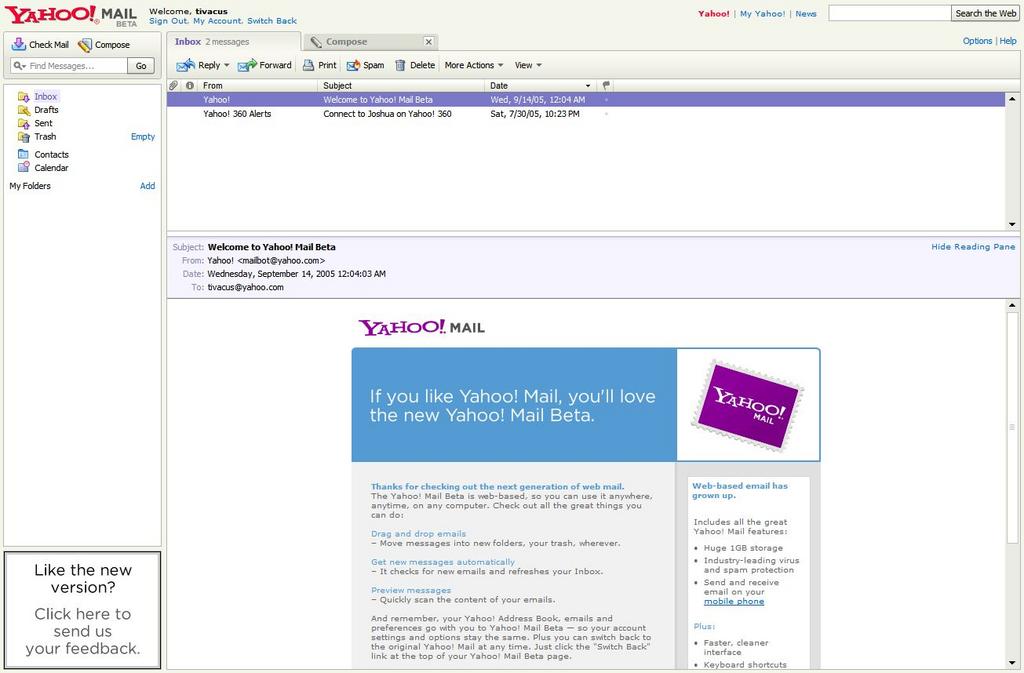 The one limitation is you can't create subfolders with either. And with AIM, you must go to a separate page to create or empty folders; Yahoo has those functions easily accessible from the main page, just like desktop-based software.
 Overall, I find Yahoo easier to use, and it's quite impressive for a product that's only weeks old. I expect even more features by the time a final version is released.
 Even as a power user, it took me awhile to get used to it. I've invested plenty of time teaching my parents how folders work and I'm not ready to "unteach" that.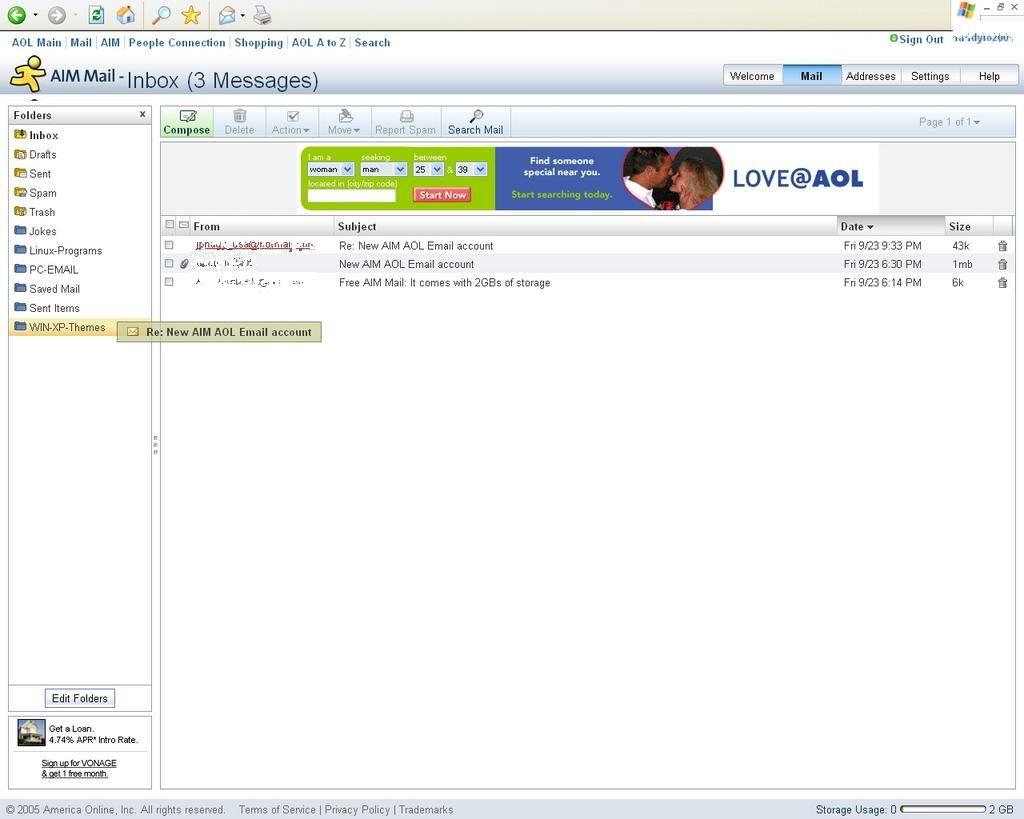
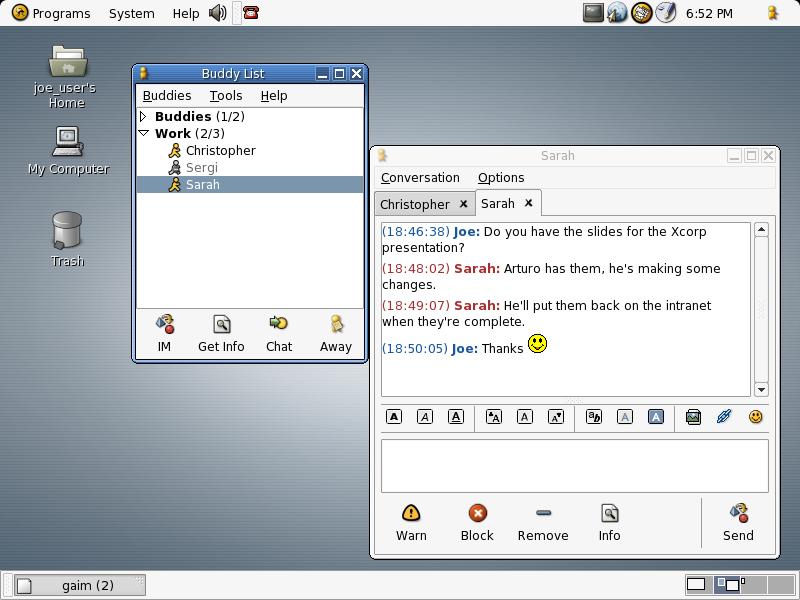 Gaim supports many features of the various networks, such as file transfer, away messages, typing notification, and MSN window closing notification. It also goes beyond that and provides many unique features. A few popular features are Buddy Pounces, which give the ability to notify you, send a message, play a sound, or run a program when a specific buddy goes away, signs online, or returns from idle; and plugins, consisting of text replacement, a buddy ticker, extended message notification, iconify on away, spell checking, tabbed conversations, and more.


