April 19, 2023

Watch Live TV on Fire Stick with LiveNetTV

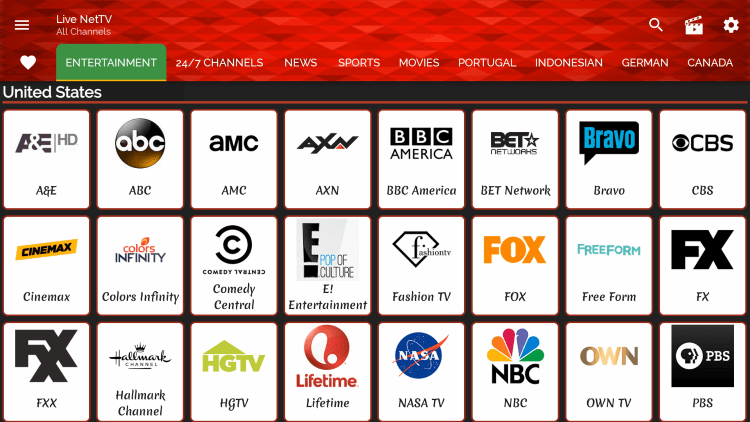
Live Net TV Channels

As mentioned previously, Live Net TV provides hundreds of live channels that are completely free to stream.

These channels come in a variety of categories such as entertainment, 24/7 channels, news, sports, shows, movies, and more.

This IPTV app even has options for major sports channels, adult, and other offerings not included in some services.

As mentioned previously, Live Net TV provides hundreds of live channels that are completely free to stream.

 Using the Downloader application:

Enter the following URL – livenettv.bz and click Go.

It is important to use a VPN when viewing this application.  There are many free ones as well.

Source: https://iptvwire.com/live-net-tv/

February 6, 2023

How to Watch Samsung TV Plus on Firestick


Samsung TV Plus is a free IPTV service where you can stream various TV channels. It contains TV channels from different countries and regions.

To get Samsung TV Plus, you don’t have to pay for anything. You also don’t need to sign up with any type of registration or subscription.

Featuring many live TV channel genres, there is a great mix of content for everyone! Suppose you want to watch sports, news, cooking, and gaming videos – then Samsung TV Plus has channels for every category.

The total number of Samsung TV Plus channels is 190. It means you won’t run out of Live TV channels to browse during your free time! The vast collection of media files lets you pick any movies, videos on demand, or live TV shows for streaming.


How to Watch Samsung TV Plus on Fire TV Stick

The Samsung TV Plus IPTV service is 100% free. However, you cannot use the Samsung TV Plus APK on Firestick. Although it is available from the Google Play Store, you have to use another IPTV app to stream its contents. Let us now teach you how to watch Samsung TV Plus on a Fire TV stick.

To get Samsung TV Plus working on Fire TV stick, you have to jailbreak your Fire TV stick and install the downloader app. Afterward, you have to install the IPTV Smarters Pro app to access an M3U playlist containing Samsung TV Plus channels.

How to Install IPTV Smarters Pro and Load the Samsung TV Plus M3U Playlist (Screenshots)

Open your Firestick Settings Tab. (Gear Wheel Icon).

You can either say Downloader to your Alexa voice-enabled remote or start typing it. If you typed it, click on the suggestion when it appears.

Type in: reviewvpn.com/ismrt and click the Go button.

Click on the Install button.

IPTV Smarter Pro app will install automatically on your Fire TV stick.


19. Wait for the IPTV Smarter Pro app to load its interface.

IPTV Smarters Pro (6)


20. On the Device Option window, select the TV option.

Samsung TV Plus


21. Click the Load Your Playlist File/URL button.

Samsung TV Plus


22. Press Allow letting the IPTV Smarters Pro app access your media files.

Samsung TV Plus


23. Tap on the Playlist Name input box.

Samsung TV Plus


24. Type STVPlus and click the Next button.

Samsung TV Plus


25. Select the M3U URL option.

Samsung TV Plus


26. Tap on FILE/URL: Input M3U line.

Samsung TV Plus


27. Type in: https://i.mjh.nz/SamsungTVPlus/all.m3u8 and click the Next button.

Samsung TV Plus


28. Press the ADD USER button.

Samsung TV Plus


29. Please wait while the M3U Playlist is loading.

Samsung TV Plus


30. Select the Live TV option.

Samsung TV Plus


31. Choose any country or live TV channel you want to watch.

Samsung TV Plus

Source: https://reviewvpn.com/samsung-tv-plus/

How to Download Any Video From the Internet: 11 Free Methods

Downloading videos off the internet is surprisingly easy. Here are free ways to grab any video you want.

Do you want to download videos from the internet? If you see a video you like on Facebook, YouTube, Vimeo, or other leading video sites, you might want to create a copy to keep it forever.

Thankfully, downloading videos off the internet is surprisingly easy, and we'll look at the best ways to do it for free.

In this article, we cover video downloaders for specific social media sites, flexible all-in-one downloaders, and screen recorders so you can be sure to get any video you want online.

1. Y2Mate


Y2Mate is one of the best YouTube video downloaders. Just copy the URL of the YouTube video you want to download, paste it into the Y2Mate’s URL field, and press Enter. On the next page, click the green Download Video button.

Then, choose from five download resolutions (144p, 240p, 360p, 480p, 720p, and 1080p) in MP4 or WebM format. The estimated file size is also shown. Click the Download button next to your preferred resolution to start downloading the YouTube video for offline viewing.

You can also use Y2Mate to download the MP3 audio of YouTube videos.

2. SSSTik


SSSTik is a popular TikTok video downloader. This tool stands out because it lets you download TikTok videos without the watermark.

Like Y2Mate, the download steps are essentially the same. Just copy the TikTok video’s URL, paste it to SSSTik’s URL field, and click Download. Then, click the Without Watermark button to download the TikTok video.

You can also use SSSTik to download the MP3 audio used in the TikTok video.

3. DownloadTwitterVideo


Twitter doesn’t have as many video posts as TikTok or Facebook, but if there’s any video you want to download from there, Download Twitter Videos does the job.

Copy the tweet's URL containing the video you want, then paste it to Download Twitter Videos. You can select whether you want to save it as MP4 or MP4 HD.

4. iGram


Instagram initially forged its reputation as a photo-sharing service, but it has since also positioned itself as a video platform. iGram helps you download Instagram reels and videos as MP4 files.

Besides videos, you can also use iGram to download Instagram photos. You can choose three different resolutions, but any photo you download will only be available as a JPEG.

5. FDown


FDown is a tool for downloading public videos or reels off Facebook. Just copy the Facebook URL and paste it to FDown to download it. You can choose to download the Facebook video in normal or HD quality.

Take note that FDown may sometimes provide an inaccurate video duration estimate. For example, the site may detect that your 3-minute video is 180 hours. You can simply ignore this. Rest assured that your downloaded file will have the correct duration.

FDown also has a Chrome extension called Video Downloader Plus. With the extension, you don't need to leave the social network's homepage if you find something you want to save. However, the extension will only let you download videos in HD quality, and thus the file size will be larger.

In the past, FDown also served as a private Facebook video downloader. Although the service has been disabled since 2019, there are still alternative methods to download private Facebook videos.

6. Pokopin


Pokopin is a Pinterest video downloader. If you’re browsing your topic of interest and come across a good video tutorial, you don’t have to find its original YouTube or TikTok source to download it. With Pokopin, you can download the video directly from Pinterest.

In Pinterest, tap the video pin to open it on a new webpage. Then, copy its URL and paste it into Pokopin’s URL field. Click the red Download button. Pokopin will generate a link to download the Pinterest video in MP4 format.

7. Freemake Video Downloader


Freemake Video Downloader is a desktop app that lets you download videos from over 10,000 sites. The list includes YouTube, Facebook, Vimeo, Dailymotion, and more. The app is available for both Windows and Mac.

You can use Freemake to save videos, playlists, and channels in formats such as MP4, MP3, AVI, WMV, MPEG, 3GP, and FLV. All you need to do is launch Freemake, copy the video URL from your web browser, paste it into the app, and pick your preferred format.

Overall, Freemake is a top all-in-one app. However, note that it does not support downloading videos from YouTube Music or any other copyright-protected video.

8. ClipConverter


If you don’t want to go out of your way to install a video downloader app on your computer, you can head to your web browser and try out ClipConverter.

With ClipConverter, you can easily download any video from popular sites like YouTube and Vimeo. Other supported platforms include (but are not limited to) Reddit, Tumblr, MySpace, and Twitch.

You can opt to download your video in MP4, 3GP, AVI, MOV, and MKV formats. If you just want the audio, you can download that in MP3, M4A, or AAC format. The developers also offer a browser add-on for Chrome, Firefox, and Safari.

9. Online Video Converter


OnlineVideoConverter is an alternative video downloader you can check out too. Besides common platforms such as YouTube, Vimeo, Facebook, and Instagram, OnlineVideoConverter also lets you download videos from sites like TED, 9GAG, and Veojam.

After pasting the video URL, change the format dropdown to MP4 and select your preferred video quality. Click Start for OnlineVideoConverter to generate your video download link.

10. VLC Media Player


VLC Media Player is one of the best free media players. The beauty of using VLC is that it's a program many users already have installed on their machines and negates the need for third-party apps.

If you already have this desktop app, you can download online videos for free right away. The first step is to copy the web URL of your video. Next, in VLC, go to Media > Open Network Stream. Paste the URL in the empty field under Please enter a network URL and click Play.

Your video should start playing in VLC. Then, go to Tools > Media Information. Copy everything in the Location field, paste that into a new web page, and you’ll see the video in your browser. Click the ellipsis icon and select Download to get the video in MP4.

Unfortunately, VLC can't download YouTube videos. However, you can still use it for other sites, such as Vimeo and Dailymotion.

11. OBS Studio


We're closing out our list with one final tip and software recommendation. When you have exhausted all other download possibilities, you can instead play the video, set it to full screen, then screen record your device. Make sure you also enable system sound recording to record the video's audio.

OBS Studio is one of the best free screen recorder apps on the web. It's available on Windows, Mac, and Linux, and it also includes a powerful editing tool. There are other similar free screen recorders for Windows and Mac, but you should start with OBS Studio as it's one of the better options.

Alternatively, simply check if your device has a built-in screen recorder, so you don’t need to install third-party ones. You can screen record on your Windows PC using the default Xbox Game Bar. There are also a couple of methods to record your screen on a Mac.

Downloading Videos From the Internet? A Word of Warning…

Please remember that all the tools listed in this article are for creating recordings of free online videos for personal use. They should not be used to save and distribute copyrighted material. Doing so could get you in serious trouble with the law.

Downloading videos is also against some sites' terms of service. Your account could be suspended or permanently banned. Keep this in mind when you’re thinking of downloading any video from the internet.

Source: https://www.makeuseof.com/tag/18-free-ways-to-download-any-video-off-the-internet/
January 12, 2023

The 12 Best Free Music Download Sites to Legally Download Music for Free

 Here are several sites where you can download free music without resorting to digital piracy. Grow your digital music collection legally.

With the rise of music streaming services, you can now listen to music legally and enjoy them in high quality. However, the biggest turnoff is that you'll often need to pay to download the songs.

This article covers the best MP3 download sites that legally allow you to download music for free. Some of them also allow you to use their free music in videos without fear of violating copyright rules.

1. YouTube Audio Library

 
The YouTube Audio Library is where you'll find lots of aesthetic music you've mostly heard in vlogs. It's mainly aimed at people who need royalty-free music for YouTube videos. As long as you have a YouTube account, you can access the library via YouTube Studio and download as many songs as you wish.

According to the library's terms and conditions, you can use the tracks in any content you create; it's not just limited to videos. You can also use the songs in monetized videos on the YouTube platform. In addition to free music tracks, the YouTube Audio Library also includes sound effects.

Each song has a sample available, which you can listen to by hitting the small Play icon. If you like what you hear, click the adjacent Download button. Attribution is not required unless the track carries a Creative Commons license.

2. Free Music Archive


The Free Music Archive has been around for many years but remains as popular as ever. It is one of the best places on the web to download music for free.

WFUM—an independent freeform radio station in New Jersey—is the site's founder. Most of the free song downloads are from lesser-known artists, but occasionally you will see a famous name pop up. Regardless, it is a great way to discover new music.

You don't need to worry about legality, as all the tracks on the site are perfectly free to download and listen to. However, if you're planning to alter the songs in some way or use them in a commercial setting, you need to check the license associated with each individual recording and follow the correct attribution format.

3. Jamendo


Jamendo is a platform that allows independent artists to easily distribute their music to their fans. The site has two sections: Jamendo Music and Jamendo Licensing. At Jamendo Music, all the songs are free and legal to download and play for personal use.

The music is built around "Communities." Navigating a particular community (for example, rock) will introduce you to its leading tracks, albums, and artists. You can sort the music by all-time popularity, what's trending, and the latest releases. If you want to test the waters before you commit to a download, you can tune in to one of the site's themed radio stations.

Take note that you can't stream Jamendo Music tracks in a public location or use them in a commercial project. Only music under Jamendo Licensing can be utilized for this purpose. You can download low-quality samples for free and later pay for the subscription if it's what you need.

4. NoiseTrade


They say there's no such thing as a free lunch. And if you use NoiseTrade, that's partly true.

The artists who have listed their music on this site want something in return for the free download, typically a postal code or an email address. The idea is for the bands to easily connect with people who like their music—perhaps to advertise an upcoming tour or highlight the launch of a new album.

At NoiseTrade, you're more likely to find artists you recognize. Although you're not going to find The Killers' latest release, most bands are already signed to a record label and have albums available.

5. Musopen


What if pop, rock, and other mainstream genres aren't your thing? If you're more into classical music, you're in luck.

Musopen is a great free music download site for classical music lovers. It has recordings from some of the most famous musicians of all time. You'll find everything from Bach and Beethoven to Tchaikovsky and Holst. You can search by composer, instrument, period, and mood to locate the content you want.

The site extends beyond music downloads; you'll also find lots of free sheet music and educational resources.

6. Amazon


Many people don't realize that Amazon can be a source of free music downloads. Under Music by Price in the search filter, just select Free to obtain a list of free downloadable songs.

Unfortunately, Amazon has removed the feature that allowed you to filter the free music by genre. As such, you'll need to go through each page of Amazon's search results and do the digging yourself.

To download the free song or album, tap on it in the search result. Next, hover over Purchase Options and click MP3 Music, which will display the price as $0.00. Then, simply check out your Amazon purchase as usual.

7. The Internet Archive


Did you know that the Internet Archive is useful for much more than only laughing at how bad the web looked in 1999? It's also a fantastic free music website.

For a music lover, the best part of the site is the Live Music Archive. It was built in partnership with etree.org and features shows and concerts from a range of leading artists. All the bands in the collection are "trade-friendly," meaning they've granted fans the right to trade some of their music for non-commercial means freely.

The library doesn't just cover music; it's also one of the best websites to download audiobooks. And you'll also find old news and public affairs talks, radio shows, and poetry readings.

8. ReverbNation


ReverbNation is a great site if you're an up-and-coming band that wants to sell music online. Since the site is primarily aimed at new bands, you're not going to find tracks from the current chart-toppers. Don't let that put you off, though.

ReverbNation has launched the careers of many top bands, including the Alabama Shakes and Imagine Dragons. That means you can be the coolest kid at school by downloading music from tomorrow's hippest artists before they become famous.

To download an artist's music, you need to create an account on the site first, head to the artist's profile, and tap the Become A Fan button. The Download icon will then appear next to the selected songs available for users to download.

9. Last.fm


Owned by Paramount Global, Last.fm is a large music website that tracks your music and recommends new songs accordingly. One of the goodies the site offers is a list of free music downloads. Just tap the Download icon next to the track, and you're good to go.

While you can download the music for free, it's best only to play them for your personal enjoyment because the site does not state that the free songs can be used for commercial projects.

10. SoundClick


Like so many of the sites on this list, SoundClick mainly features new artists who seek to share their music and step into the music industry. To download the music, just create an account, type a keyword in the search field, and from the results, tap the Download icon on the song you want.

However, not all the songs on the site are available to download for free; the artist has to make each track available on a case-by-case basis, and some require a small payment.

SoundClick's terms and conditions state that while you can legally download the songs for personal or educational use, you cannot modify them or stream them at a public venue.

11. CCTrax


CCTrax offers free music downloads that are covered by a Creative Commons license. It specializes in electronica, dub, techno, and ambient tunes.

You can download every song on the site, and no payments are involved anywhere. However, be alert to the Creative Commons license. You can filter the music by license type on the main page so that the tracks from the resulting list can be utilized without legal repercussions. ​​​​​

12. BeatStars


BeatStars is a global music marketplace for producers and artists. Despite the platform's commercial nature, it still serves as a good free and legal music download site for casual listeners.

Under the Free Beats category, you can filter the songs by tags such as hip-hop, trap, soul, and more. Once you find a song you like, just tap the Free Download icon to download the MP3 file to your device.

You may notice that there is a price listed next to the icon. The price details the purchase and usage terms if you intend to use the music for a song recording, video, public performance, or other similar purposes.

Legally Download Music for Free

The sites above mostly specialize in helping you download music from unknown and upcoming artists rather than current stars. It's largely inevitable, as the latter does not need to distribute their music for free. Generally, if a site offers a free download of Justin Bieber or Taylor Swift's latest album, it's probably illegal.

If you want to legally download the latest mainstream singles, you still need to use paid services like Spotify. But if your goal is to discover gems by independent artists or get free songs for your YouTube videos, all these sites will meet your music needs well.

Source: https://www.makeuseof.com/tag/where-to-get-free-music-legally

December 31, 2022

“Radio Garden” Lets You Explore the World’s Radio Stations


While radio isn’t particularly hard to access — after all, you just need a device capable of tuning into radio frequencies — listening to radio outside of your area can be difficult. This app, however, lets you listen to any radio station in any country around the world, complete with a fun interface.

Radio Garden is available as a web version, and it also has mobile apps for Android and iOS. Its whole premise is that you can listen to a number of radio stations in many different countries and cities — you’ll see a bunch of small green dots all across the globe, and those are radio stations that you can tune into immediately. You don’t even need a login or any kind of subscription. All you need is a device that can access the internet, like a computer or smartphone.

Radio Garden images

I played around with the Android version for a bit, and I managed to tune into stations from all across the United States, as well as to a few stations in South American and European countries. As a true test of its global capabilities, I even tuned into a station located in the isolated city of Pyongyang, North Korea, and I was successful.

It’s definitely something you should give a shot, even if it’s to have fun for a bit.

Via: Pepsilora (Mastodon)

Source: https://www.howtogeek.com/857850/radio-garden-lets-you-explore-the-worlds-radio-stations/

November 3, 2022

How to Download Any Video From the Internet: 19 Free Methods

Downloading videos off the internet is surprisingly easy. Here are free ways to grab any video you want.


Readers like you help support MUO. When you make a purchase using links on our site, we may earn an affiliate commission.

Do you want to download videos from the internet? If you see a video you like on Facebook, YouTube, Vimeo, or any of the other leading video sites, you might want to create a copy so you can keep it forever.

Thankfully, downloading videos off the internet is surprisingly easy, and here are the best ways to do it.

1. SaveFrom


SaveFrom is a YouTube downloader, but with a difference. If you are watching something online and you want to save it, just enter "ss" before "YouTube" in the URL. It's a web trick to download the video from the website.


For example, https://www.youtube.com/watch?v=aS01LwpC23g would become https://www.ssyoutube.com/watch?v=aS01LwpC23g.

The tool also lets you download videos from sites like Vimeo, Yandex, Dailymotion, Instagram, TikTok, Facebook, Live Journal, and more.

Remember, if you are having trouble downloading YouTube videos from outside your country, check out our article explaining how to bypass YouTube's regional filter.

READ MORE: How to Download YouTube Videos For Offline Viewing

2. FastestTube


While there are a number of free YouTube downloaders that download videos in bulk, let’s look at the simplest solution when you only need a couple of videos.

FastestTube is a browser extension that adds a physical download button to YouTube. You can find it in the bottom right-hand corner of a video. It works on Chrome, Firefox, Safari, and Opera.


3. DownloadTwitterVideo


DownloadTwitterVideo lets you pull any video off the world's favorite transient social network.

Paste in the URL of the tweet which contains the video you want, then select whether you want to save it as an MP3, MP4, or MP4 HD.
4. Instagram Downloader


Instagram forged its reputation as a photo-sharing service, but with the introduction of Instagram Stories, it has also positioned itself as a video platform. Instagram Downloader lets you download Instagram videos from the social media site.


5. FDown


FDown is a tool for downloading videos off Facebook. It also comes with a Chrome extension, meaning you don't need to leave the social network's homepage if you find something you want to save.

In the past, FDown also served as a private Facebook video downloader. Although the service has been disabled since 2019, there are still alternative methods to download private Facebook videos.


6. Y2Mate


Y2Mate is a dedicated YouTube downloader. Like the other YouTube downloaders, the process is simple. Just grab the URL of the video you want to save, paste it into the web app's URL field, and hit Start to download the video from the website.

You will have the choice of downloading the entire video or just the audio track.


7. Media.io


Medio.io is an online tool by Wondershare. If you watched a YouTube video and would simply like a snippet for personal use, Medio.io makes it easy for you to trim the video first before you download it from the site.

Just copy and paste the video URL to Media.io. Once it loads completely, drag the video down to the editing timeline to trim it. After you’re done, click Export to download the video to your computer.


8. YooDownload


YooDownload is another competitor to the likes of sites such as VideoGrabby. It works with YouTube, Vimeo, Facebook, Twitter, Instagram, Vid.me, and SoundCloud.


9. ClipConverter


ClipConverter works with almost any website you can think of (subscription streaming services notably excluded). It can even download videos from social networks like MySpace! The developers offer a browser add-on for Chrome, Firefox, and Safari.


10. OnlineVideoConverter


You may have noticed that most video downloaders work with the same set of sites and that many of these web apps are similar. So, let’s introduce you to a different site.

Besides YouTube, OnlineVideoConverter lets you download videos from internet sites such as TeacherTube, VK, CollegeHumor, and more.


11. VLC Media Player


Sometimes it's better to use a desktop app than a web app. They can offer features that web apps cannot replicate. One such app is VLC Media Player, one of the best free media players for Windows.

Clearly, VLC does much more than merely download videos from the internet. The beauty of using VLC is that it's a program many users will already have installed on their machines and negates the need for third-party apps.


12. Video Grabber


Video Grabber has three key features: downloading video, converting video, and recording your screen. Even though it initially looks like a web app, it is actually a desktop program.


13. FLVTO


FLTVO has a web app and a desktop version. The desktop version lets you queue videos to download from multiple internet sources and automatically download new videos as they become available.


14. Freemake


Freemake is a desktop app that lets you download videos from more than 10,000 sites. The list includes YouTube, Facebook, Vimeo, Dailymotion, Twitch, and Veoh. The app is available for both Windows and Mac.

You can use Freemake to save videos, playlists, and channels in HD, MP4, MP3, AVI, 3GP, and FLV formats. However, take note that it does not support the downloading of videos from YouTube Music.


15. Videoder


Videoder is another downloadable app that you can use to download any video from the internet for free. It is available for Android and Windows.

The app supports more than 1,000 sites, including TikTok, Facebook, Instagram, Twitter, Voot, Ozee, 9Anime, and Dailymotion.


16. SnapDownloader


SnapDownloader, which is available for Windows and macOS, allows you to download videos from YouTube, Facebook, Twitter, Vimeo, and more.

If you need to download more than one video, you will need to pay. The app costs $40 for a lifetime license for one machine. Alternatively, you can pay $70 to use it on three machines.


17. AllMyTube


Wondershare makes a whole suite of useful apps, and the company's AllMyTube software is no different.

With 10,000 supported sites, you can download videos for offline viewing from all the major video platforms. This includes YouTube, Vimeo, and Dailymotion, as well as slightly more niche sites such as Viewster and Twitch.

You can download videos for free, but if you need to do bulk downloading, you will have to pay a fee of $20/year.


18. Open Broadcaster Software


We're closing out our list with a pair of screen recorders. These tools let you record whatever is playing on your computer. So, use these free screen recorders for Windows and Mac to easily download videos from the internet when you have exhausted all other possibilities.

OBS is unquestionably the best free screen recorder app on the web. It's available on Windows, Mac, and Linux, and it also includes a powerful editing tool.


19. CamStudio


CamStudio doesn't look as slick as OBS and doesn't boast as many features, but it's simpler to use. Thus, it's perfect for someone who just wants to click Record, let the video runs its course, and simply download the recording later.
Downloading Videos From the Internet? A Word of Warning…

Please remember that all the tools listed in this article are for creating recordings of free online videos for personal use. They should not be used to save and distribute copyrighted material. Doing so could get you in serious trouble with the law.

Downloading videos is also against some sites' terms of service. Your account could be suspended or permanently banned. Keep this in mind when you’re thinking of downloading any video from the internet.

Source: How to Download Any Video From the Internet: 19 Free Methods (makeuseof.com)